CameraShake MonoBehaviour
Overview
The CameraShake behaviour is used to add constant and one-shot shake effects to the first person camera.
Constant shake effects can be applied using shake zones such as the BoxShakeZone, BoxShakeZone2D, SphereShakeZone and CircleShakeZone. You can also set the global shake value directly with scripts using the following code:
ShakeHandler.globalShake = shakeAmount;
Where shakeAmount is a float value between 0 (no shake) and 1 (maximum shake).
You can apply a one-shot shake using the following method:
public static void ShakeHandler.Shake(Vector3 position, float innerRadius, float falloffDistance, float strength, float duration, bool requiresGrounding = false)
Inspector
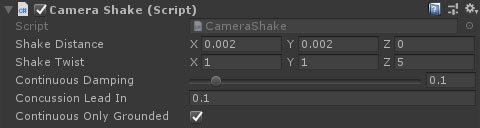
Properties
| Name | Type | Description |
|---|---|---|
| Shake Distance | Vector | The distance the camera can move either side of the origin on each axis at a shake strength of 1. |
| Shake Twist | Vector | The max rotation (in each direction) for a shake strength of 1. |
| Continuous Damping | Float | Damping smooths the blend between different continuous shake strengths. |
| Concussion Lead In | Float | The time it takes for the shake to go from 0 to 1. |
| Continuous Only Grounded | Boolean | Should continuous shake only be applied while the character this is attached to is grounded (if there is a character). |