Interactive Objects
Overview
Interactive objects are objects in the scene that the player can approach and use to perform some action.
Objects can specify whether to react instantly or once the use button has been held for a set period of time.
As the player looks at an interactive object, events are fired that allow custom highlights and effects to be added. This can be utilised to show markers as in the sample assets, to change a shader setting, or to flag up an object with a HUD element.
Example interactive objects include doors, buttons and weapon pickups.
For more information see the CharacterInteractionHandler and InteractiveObject references.
Creating An Interactive Object
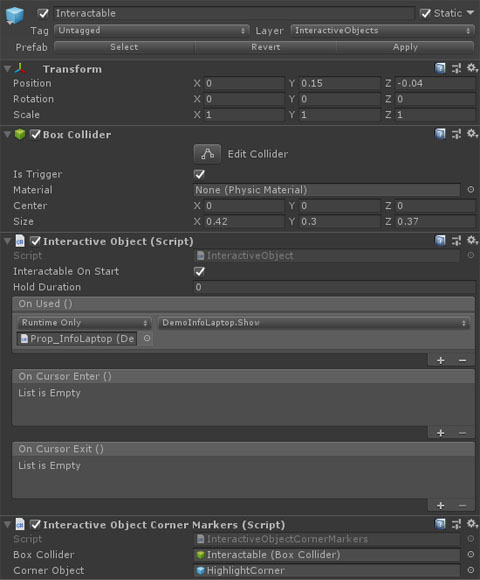
Interactive objects use events to call methods on attached components and perform some function.
To make an object interactive, first add a GameObject to its hierarchy and set its layer to InteractiveObjects. Next, add a primitive collider to the new object and set its IsTrigger property to true. With the trigger collider set up, add an InteractiveObject component to the object and set its hold duration (0 means the object will be used instantly when the player hits the use button, anything else means the player needs to hold the use button down for that duration). Finally, set the OnUse event on the component to point to a relevant method on one of the original object's components.
Alternatively, you can write a script that inherits from InteractiveObject and override the Interact (ICharacter character) method to add implement the required behaviour.