NeoCharacterController Behaviour
Overview
The NeoCharacterController handles movement of characters and their interaction with the physical environment.
Inspector
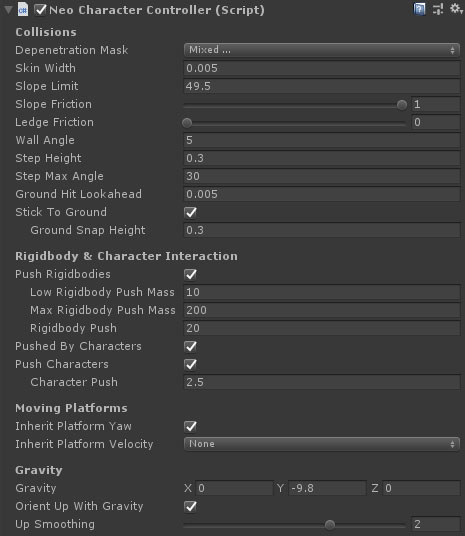
Properties
Collisions
| Name |
Type |
Description |
| Depenetration Mask |
LayerMask |
The physics layers that the character will depenetrate from. This cannot include anything outside of the collision matrix for the gameobject layer. Use this to filter out small dynamic props that should not influence the player. |
| Skin Width |
Float |
When performing the move loop, the capsule is shrunk by this amount. When testing for contacts it is grown by this amount. |
| Slope Limit |
Float |
The maximum distance above the ground to apply a "sticky" downforce on the frame after leaving the ground. |
| Slope Friction |
Float |
The friction of ground contacts when standiong on a slope. At 1, all downward velocity will be cancelled out. At 0, the character will slide down the slope. |
| Ledge Friction |
Float |
The friction of ground contacts when overhanging a ledge. At 1, the character will not slide off the ledge. |
| Wall Angle |
Float |
The angle (in degrees) from the vertical for a surface to be considered a wall. |
| Deflection Curve |
AnimationCurve |
A curve that defines the deflection drop off based on angle from normal. Y-axis is the deflection multiplier, X-axis is the normalised angle (0 = 0 degrees, 1 = 90 degrees) |
| Step Height |
Float |
The character will traverse any ledge up to their radius in height. If the step is equal to or below the step height then the character will not lose any horizontal speed when stepping up, and any vertical movement does not count to the character's velocity calculations. |
| Ground Snap Height |
Float |
The maximum distance above the ground to apply a "sticky" downforce on the frame after leaving the ground in certain conditions. This prevents leaving the ground when stepping onto down-slopes or off low steps. |
| Stick To Ground |
Boolean |
Should the character stick to the ground when walking down steep slopes or over the top of ramps. |
| Ground Hit Lookahead |
Float |
The distance to check ahead of a contact (based on contact normal) to see if it was a slope or a step. Set this higher if you are using physics with bevelled corners instead of primitives (naughty). |
Rigidbody and Character Interaction
| Name |
Type |
Description |
| Push Rigidbodies |
Boolean |
Do not apply forces to non-kinematic rigidbodies if false. |
| Low Rigidbody Push Mass |
Float |
Any rigidbodies this mass or below will be pushed with the full push multiplier. Above this and it drops off to zero at max mass. |
| Max Rigidbody Push Mass |
Float |
Any rigidbodies above this mass will have zero force applied to them. |
| Rigidbody Push |
Float |
A multiplier for the push force at or below the minimum push mass. At normal gravity with no physics materials applied, a 1m box will be on the threshold of moving when this is set to 10. Higher will push the box up to the character's velocity with greater acceleration. |
| Pushed By Characters |
Boolean |
Can this character be pushed by other INeoCharacterControllers. |
| Push Characters |
Boolean |
Can this character push other INeoCharacterControllers. |
| Character Push |
Float |
A multiplier for the push force when pushing characters at or below this characters mass. Drops to 0 when approaching max push mass. |
| Name |
Type |
Description |
| Inherit Platform Yaw |
Boolean |
Does the character inherit yaw changes from moving platforms. |
| Inherit Platform Velocity |
Dropdown |
What component of the platform velocity should be included in the character velocity. Options are as follows:- None - any movement of the platform is ignored when calculating the character velocity. This prevents exponential acceleration if the character tracks momentum.
- Full - the movement of the platform is included in character velocity calculations.
- Horizontal Only - only the horizontal movement of the platform is included in character velocity calculations. Vertical movement is ignored.
- Vertical Only - only the vertical movement of the platform is included in character velocity calculations. Horizontal movement is ignored.
|
Gravity
| Name |
Type |
Description |
| Gravity |
Vector3 |
The gravity vector (direction and acceleration) for the character. |
| OrientUpWithGravity |
Boolean |
If this is true, then adjusting the gravity direction will reorient the character so that down is in the direction of gravity, and up is opposed. |
| UpSmoothing |
Float |
The duration (in seconds) it takes to rotate the character up vector a whole 180 degrees. |
Note
Due to a change in the way ground slope collisions are resolved, the slope speed curve settings have been removed and are now applied to the movement states in the motion graph directly.
See Also
NeoCharacterController
Unity CharacterController