Sample UI
Overview
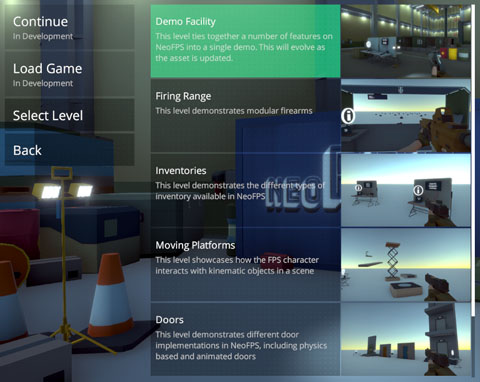
The sample UI is a tweaked implementation of the main Unity UI controls for more consistent menus that work with mouse navigation as well as keyboard or gamepad.
The original Unity UI source can be found here.
The main reasoning is to create a set of menu controls with multiple elements that can work as one. For example, a slider menu item in the options menu could comprise of a slider, a + button, a - button and a text input field. These all work together to drive and display the correct value. When using a mouse, dragging on the slider or clicking the buttons will change the value and that will be shown in the input field. Clicking the input field will capture keyboard input, which will set the new value and position the slider to match. When using a gamepad, highlighting the menu entry and hitting submit will give it focus. Until the user cancels or hits submit again the direction controls will update the value (eg. right is increase, left is decrease) instead of navigating to the next item.
The sample UI also has basic layout functionality using menu panels and navigation bars.
Lastly, the sample UI also implements popups that can be displayed from any script. This is used with the DemoInfoLaptop to provide info popups when used.
Using the sample UI is not a requirement for any of the features of NeoFPS. It is only intended for use in the NeoFPS samples and needs extra work to be considered a complete solution for use in other games. It can be useful, however, in demonstrating how to block character input whilst accessing UI elements
UI Styles
The sample UI uses UiStyle scriptable object assets to define a consistent style for the UI elements. The examples include the following assets:
- UiStyleMenus asset is used for menu buttons and items
- UiStyleMenuGroups asset is used for the foldouts and dropdowns of menu items
- UiStyleNavigation asset is used for the navigation menus (SinglePlayer, Options, etc)