NeoSerializedGameObject MonoBehaviour
Overview
The NeoSerializedGameObject behaviour is a key component of the NeoSave system. This component must be added to any objects that need to be saved and is used to specify which of its components and child objects are serialized.
Inspector
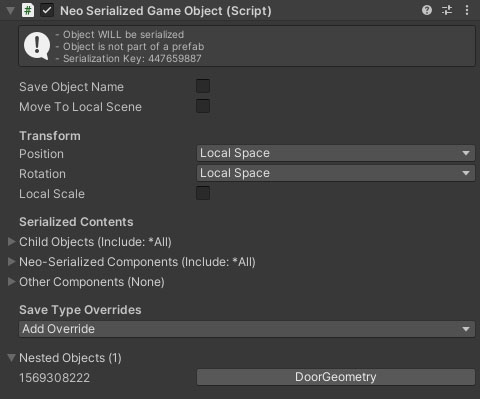
The information box at the top of the inspector gives details on the state of the object. It will list the object's serialization key, if the object was instantiated at run-time and whether the object is correctly set up to be saved. This requires that the root object has a valid and enabled NeoSerializedGameObject attached and none of its NeoSerializedGameObject parents are disabled or filtered out.
Properties
| Name | Type | Description |
|---|---|---|
| Save Object Name | Boolean | Save and load the object's name. This is not required in most cases. |
| Move To Local Scene | Boolean | If this is switched on, and the prefab with this NSGO attached is instantiated without a parent transform then it will be moved to the root of the "local" scene as tracked by the save game manager. The local scene can be set via code, or using the "Push Local Scene" setting on an AdditiveSceneSaveInfo. Doing this ensures that the object will be saved and unloaded/loaded along with the additive scene instead of falling out of the world when a section of the level is unloaded. |
| Position | Dropdown | How to save and load the object's transform position. The avialable options are Local Space, World Space and Ignore. |
| Rotation | Dropdown | How to save and load the object's transform rotation. The avialable options are Local Space, World Space and Ignore. |
| Local Scale | Boolean | Should the object transform local scale be saved and loaded or ignored. Saving scale in world space is not an option . |
Child Objects Foldout
| Name | Type | Description |
|---|---|---|
| Filter Child Objects | Dropdown | How to filter child objects for saving and loading. If set to Exclude then any objects added to the list below will not be saved. If set to Include then only objects in the list below will be saved. |
To add objects to the list, click the + button and the available objects will be shown in a dropdown.
Neo-Serialized Components Foldout
| Name | Type | Description |
|---|---|---|
| Filter Neo Components | Dropdown | How to filter the neo-serialized components attached to this game object. If set to Exclude then any objects added to the list below will not be saved. If set to Include then only objects in the list below will be saved. |
To add objects to the list, click the + button and the available components will be shown in a dropdown. A neo-serialized component is any behaviour that implements the INeoSerializedComponent interface. For more information see Serializing Data.
Other Components Foldout
Components that do not implement the INeoSerializedComponent interface can be serialized by adding them to this list. In order for a component (that is not a neo-serialized component) to appear in this list, it must be attached to this gameobject and have a valid formatter registered with the save system. For more information see Serializing Data.
Save Type Overrides
The NeoSave system allows you to define save modes using the generated constants system. By default, the samples use the save modes Default for standard game saves and Persistence for persisting certain data such as character health and inventory between scenes. You can add overrides here by clicing the Add Override button. This will show the available modes except for Default and any that have already been overriden. You can then override the filters and properties for that save mode as required or set them to use default. For example, the characters override the persistence save mode to only save the health manager and inventory components while not saving data like position, aim and motion graph states.
Nested Objects
This dropdown section will list all of the NeoSerializedGameObject behaviours that are direct children of this NeoSerializedGameObject. This does not necessarily mean that they are direct children in the scene hierarchy as this is only a requirement when instantiating a serialized prefab at runtime. In this case it must be instantiated as a direct child of an existing NeoSerializedGameObject in the scene hierarchy. If the object is placed in the scene or as a child object of a prefab outside of runtime then the only requirement is that there is a NeoSerializedGameObject on the root (prefab root or root object in the scene). You can click on an object in this list to ping it in the hierarchy.