FirstPersonCamera MonoBehaviour
Overview
The FirstPersonCamera MonoBehaviour is used with the standard Unity Camera to add useful features.
Inspector
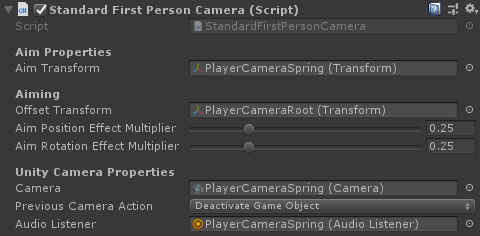
Properties
| Name | Type | Description |
|---|---|---|
| Aim Transform | Transform | The transform to use for accurate shooting. If you add extra spring effects to the camera that don't affect the gun, you might want to set this to something higher up the hierarchy. |
| Default FoV | Float | The default vertical field of view. This will also change the horizontal fov below. |
| Horizontal 16:9 | Float | The default horizontal field of view for a 16:9 screen. This will also change the vertical fov above. |
| Offset Transform | Transform | The offset from standard upright position for moving the head. Used for aiming down sights, etc. |
| Aim Position Effect Multiplier | Float | The multiplier applied to additive spring effects while aiming. |
| Aim Rotation Effect Multiplier | Float | The multiplier applied to additive spring effects while aiming. |
| Camera | Camera | The main camera for the first person view. |
| Previous Camera Action | Dropdown | What to do with the main camera in the scene? Use this to prevent wasted render cycles and multiple listeners. Options: DeactivateGameObject, DisableComponent, DestroyGameObject, Ignore. |
| Audio Listener | Audio Listener | The audio listener for the first person view. |