HeadBobV2 MonoBehaviour (Deprecated)
Overview
The HeadBobV2 behaviour is a new spring effect which uses the character step tracking system to sync complex head bob to the character. Alongside simple position bob it adds the following features:
- In-game strength settings via the gameplay options or quick-options popup
- Individual animation curves for horizontal offset, vertical offset and roll
- Aim compensation which adds a counter rotation to keep the crosshair fixed on objects as the head moves
Despite the name, the HeadBobV2 component is intended to be applied to the upper body spring so that the weapon moves with it.
Inspector
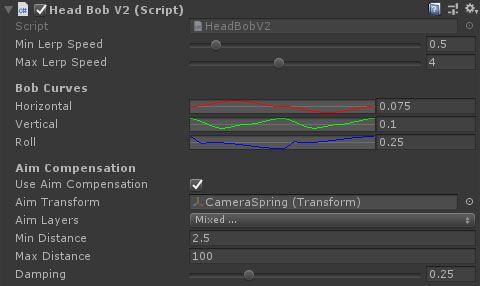
Properties
| Name | Type | Description |
|---|---|---|
| Min Lerp Speed | Float | At or below this speed the bob will be scaled to zero. |
| Max Lerp Speed | Float | At or above this speed the bob will have its full effect. |
| Horizontal | AnimationCurve + Float | The maximum position offset along the horizontal axis in either direction. The horizontal axis of the animation curve goes from -1 to 1 where -1 is left foot, 0 is right foot, and 1 is back to left foot. The Y axis is a multiplier for the float value next to the animation curve. |
| Vertical | AnimationCurve | The maximum position offset along the vertical axis in either direction. The horizontal axis of the animation curve goes from -1 to 1 where -1 is left foot, 0 is right foot, and 1 is back to left foot. The Y axis is a multiplier for the float value next to the animation curve. |
| Roll | AnimationCurve | The maximum angle to roll the camera in either direction. The horizontal axis of the animation curve goes from -1 to 1 where -1 is left foot, 0 is right foot, and 1 is back to left foot. The Y axis is a multiplier for the float value next to the animation curve. |
| Use Aim Compensation | Boolean | Aim compensation involves rotating the camera so that the crosshair stays fixed on the same point in space. |
| Aim Transform | Transform | The transform to use for camera/crosshair casting. |
| Aim Layers | LayerMask | The layers to check against for aim depth. |
| Min Distance | Float | The minimum distance to compensate against. At very close distances, the bob will have to rotate larger angles to keep the crosshair fixed on target. |
| Max Distance | Float | The maximum distance to compensate against. |
| Damping | Float | A damping against the crosshair target. Prevents objects crossing the camera at close ranges from causing sudden shifts. |