FirstPersonBody MonoBehaviour
Overview
The FirstPersonBody behaviour is used to apply foot IK and aim parameters to a character's body Animator.
The foot IK strength can be applied using the FootIk motion graph behviour on relevant states in the motion graph. It works by getting the height of the foot from a virtual ground plane in the animation, and then getting the offset of the real ground from the foot position at runtime. Foot contacts will be calculated based on the highest offset between the heel and toes bones. If one foot is lower than the virtual ground plane then the whole body will be lowered (with some damping) to prevent over-extending the leg.
Aiming is used with the NeoFPS steering system on the aim controllers (eg the MouseAndGamepadAimController). As the character looks side to side the body does not immediately match that unless steering is set to 1. The difference between the aim yaw and body yaw, along with the pitch value will be sent to the animator controller so you can use those with a blend tree or animation layers and bend the spine to match. Alternatively you can keep these settings blank, and use the ProceduralSpineAimMatcher component on your character body for a much simpler setup, though you will have slightly less control this way.
Inspector
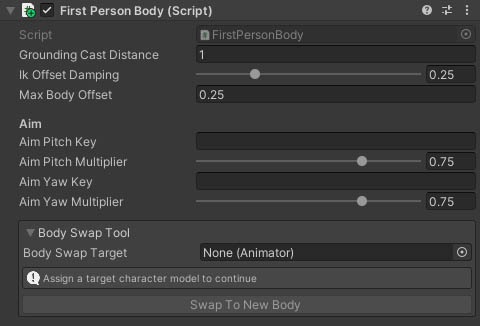
Properties
| Name | Type | Description |
|---|---|---|
| Grounding Cast Distance | Float | The distance to cast for ground detection. |
| Ik Offset Damping | Float | A smoothing value for foot offsets to prevent popping on stepped or faceted ground. |
| Max Body Offset | Float | The maximum distance downwards that the body can be shifted to prevent legs overextending on slopes. |
| Aim Pitch Key | String | The name of a float parameter on the character's animator that should be set with the pitch value. Pitch will be normalised to 90 degrees, so looking straight up would be +1 and down would be -1. |
| Aim Pitch Multiplier | Float | A multiplier applied to the pitch value to reduce any animation effect. |
| Aim Yaw Key | String | The name of a float parameter on the character's animator that should be set with the aim yaw value (relative to the body heading). Pitch will be normalised to 90 degrees, so looking right would be +1 and left would be -1. |
| Aim Yaw Multiplier | Float | A multiplier applied to the yaw value to reduce any animation effect. |
Body Swap Tool
The Body Swap Tool section provides a simple way to transfer the components and proxy objects from one body to another on the same character. To use this:
- Add a new character model with animator to the character hierarchy as a sibling of the existing model
- Assign the new character's Animator to the Body Swap Target setting in this section of the First Person Body component
- Check the info box to see if there are any problems with the new body and correct them if so
- Press the "Swap To New Body" button
This will copy the components over to the new body, move the proxy objects such as the inventory item position matcher and camera target, move the damage handlers over and modify the components on the character to point at the new body where required. It will also deactivate the old body and move it in the hierarchy so that the new body comes first. This prevents code that retrieves components using GetComponentInChildren() from returning the components in the old body instead. It does not delete the old body, instead letting you do that when you are satisfied with the result. If you are not satisfied then the tool works with Unity's undo system, but it's always best to have a backup or version control copy of the prefab to be sure.