SpawnPoint MonoBehaviour
Overview
The SpawnPoint behaviour specifies where characters are spawned. It will register with the SpawnManager when active and enabled, and deregister when deactivated or destroyed. It is recommended to have more than one in the scene in case one or more is blocked.
Inspector
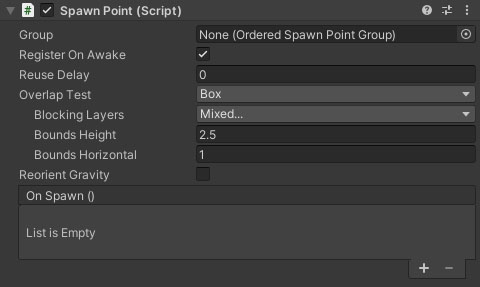
Properties
| Name | Type | Description |
|---|---|---|
| Register On Awake | Boolean | Should the spawn point be registered with the SpawnManager immediately on awake? This option will be disabled if the spawn point is part of a OrderedSpawnPointGroup. |
| Reuse Delay | Float | How long before the spawn point can be used again. |
| Overlap Test | Dropdown | The collider volume type for checking if the spawn point is clear or overlapped by another object. Options are Box, Capsule, None. |
| Blocking Layers | LayerMask | Which layers will block the character from spawning if they overlap the spawn volume. |
| Bounds Height | Float | The vertical height of the bounding volume for overlap checks. |
| Bounds Horizontal | Float | The horizontal dimension of the bounding volume for overlap checks. |
| Reorient Gravity | Boolean | Should the character's gravity be reoriented to match the spawn point. If the spawn is tilted on one side, this will make the character's down direction equal to the spawn point's. |
| On Spawn | Event | A UnityEvent fired when a character is spawned at this point. Allows for simple triggering of spawn audio and visual effects. |