InputCharacterMotion MonoBehaviour
Overview
The InputCharacterMotion behaviour passes character input to the character motion controller.
Inspector
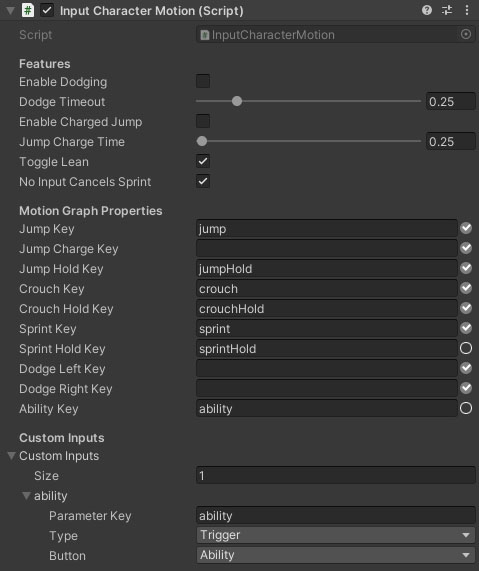
Properties
| Name | Type | Description |
|---|---|---|
| Enable Dodging | Boolean | Should double tapping a move direction dodge the character. |
| Dodge Timeout | Float | Multiple taps of a direction within this time range register as a double tap. |
| Enable Charged Jump | Boolean | Does holding the jump button charge up a jump or does the character dodge as soon as the button is pressed. |
| Jump Charge Time | Float | The time it takes to charge up a full power jump if charged jumps are enabled. |
| Toggle Lean | Boolean | Toggle leaning or hold to lean. |
| Jump Key | String | The key to the jump trigger parameter in the character motion graph. |
| Jump Charge Key | String | The optional key to the jump charge float parameter in the character motion graph. This is used for charging stronger jumps. |
| Jump Hold Key | String | The key to the jump hold switch parameter in the character motion graph. This is used for movement like swimming or flying where holding jump moves up. |
| Crouch Key | String | The key to the crouch switch parameter in the character motion graph. |
| Crouch Hold Key | String | The optional key to the crouch hold switch parameter in the character motion graph. This is used for movement like swimming or flying where holding jump moves down. |
| Sprint Key | String | The key to the sprint switch parameter in the character motion graph. |
| Sprint Hold Key | String | The key to the sprint hold switch parameter in the character motion graph. |
| Dodge Left Key | String | The optional key to the dodge left trigger parameter in the character motion graph. |
| Dodge Right Key | String | The optional key to the dodge right trigger parameter in the character motion graph. |
| Ability Key | String | The optional key to the "ability" trigger parameter in the character motion graph. This can be used for a variety of uses such as dashes, teleports, etc. |
| Custom Inputs | Array | Map input buttons to motion graph parameters here. motion graph. |
Custom Input Entries
Each entry in the Custom Inputs array has the following properties:
| Name | Type | Description |
|---|---|---|
| Parameter Key | Boolean | The name of the parameter in the motion graph. |
| Type | Dropdown | The motion graph parameter type of the target parameter. |
| Button | Boolean | Which FpsInputButton to map to the parameter. |