PickableLockedDoorInteractiveObject MonoBehaviour
Overview
The PickableLockedDoorInteractiveObject behaviour is an extension of the InteractiveObject used to trigger door open and close. If the door is locked then there are 2 ways to unlock it. Firstly, if the character has a keyring inventory item with the correct keycode, then they will unlock the door instantly. Secondly, if they do not have the correct keycode but do have lockpick items in their inventory, then using the door will show a lock-picking minigame popup.
Inspector
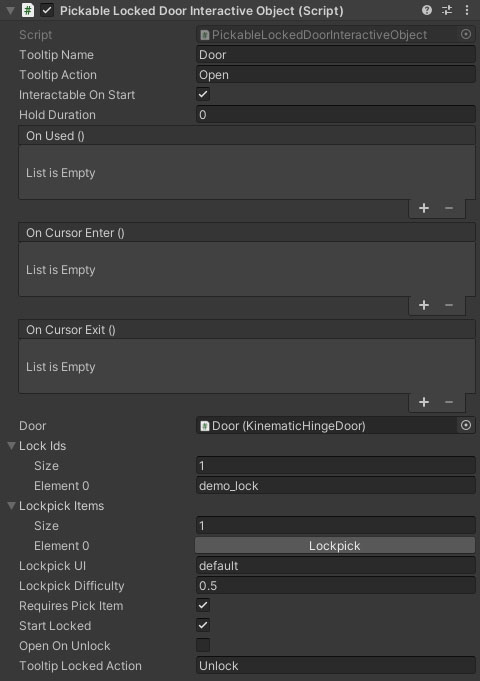
Properties
The PickableLockedDoorInteractiveObject inherits from the InteractiveObject. Check the reference for information on its properties.
| Name | Type | Description |
|---|---|---|
| Tooltip Name | String | The name of the item in the HUD tooltip. |
| Tooltip Action | String | A description of the action for use in the HUD tooltip, eg pick up. |
| Interactable On Start | Boolean | Can the object be interacted with immediately. |
| Hold Duration | Float | How long does the use button have to be held for interaction. |
| On Used | UnityEvent | An event that is triggered when the object is used. |
| On Cursor Enter | UnityEvent | An event that is triggered when the player looks directly at the object. |
| On Cursor Exit | UnityEvent | An event that is triggered when the player looks away from the object. |
| Door | Door | The door to open (will accept any door that inherits from DoorBase). |
| Lock Ids | String Array | An array of IDs for this lock. The player must have an equivalent key in their inventory key ring to unlock. If this is empty then the door must be unlocked via events or the API. IDs can be unique to this lock, or shared between multiple for things like skeleton keys. |
| Lockpick Items | Inventory ID Array | A range of inventory IDs for lockpicks in the character inventory. If you have one of these then you can pick the lock. |
| Lockpick UI | String | The ID for the lockpick UI to use. This allows for multiple lockpick styles in a single scene. |
| Lockpick Difficulty | Float | The difficulty of this specific lock. |
| Requires Pick Item | Boolean | Does the character require a lockpick item in their inventory. |
| Start Locked | Boolean | Should the door be locked on start. |
| Open On Unlock | Boolean | Should the door be opened when it's unlocked. |
| Tooltip Locked Action | String | The tooltip action to use when the door is locked. Use the open action toolrip for the other tooltip action. |