FpsInventoryInstantUseItem MonoBehaviour
Overview
The FpsInventoryInstantUseItem behaviour is an inventory item that will be used immediately when its quick-slot is selected, and perform the attached actions.
Inspector
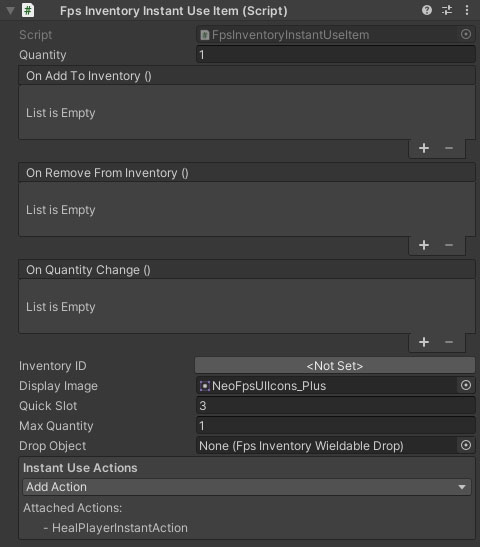
Properties
The FpsInventoryWieldable behaviour inherits from the FpsInventoryItem. Check the reference for information on its properties.
| Name | Type | Description |
|---|---|---|
| Inventory ID | ID Picker | The inventory item key. Clicking this button will open the inventory database item picker. |
| Display Image | Sprite | The image to use in the inventory HUD. |
| Quick Slot | Int | The quick slot the item should be placed in. If you are using a stacked inventory, remember that each stack is 10 slots (0-9 = stack 1, 10-19 = stack 2, etc). |
| Max Quantity | Int | The maximum quantity you can hold. |
| Drop Object | FpsInventoryWieldableDrop | The prefab to spawn when the wieldable item is dropped. |
| Actions | Array | The actions to perform when the instant use item is triggered. You can add new actions from the dropdown here, or via the Add Component menu for the gameobject. |