Inventory Examples
Overview
NeoFPS comes with a number of example inventories that are modelled after popular first person shooters.
Base Classes
All of the example inventories inherit from a single base class FpsInventoryBase. This base class handles both the inventory storage and the quick-slots. It also provides inspector properties for initialising the inventory's starting contents and the priority order for the quick slots.
The example inventory items inherit from a single base class FpsInventoryItemBase. For simple items such as ammo or armour, the items use the FpsInventoryItem behaviour which extends this base class and specifies the ID and max quantity.
If an item is meant to be selected or used by the player via an input such as the number keys, then the items must also implement the IQuickSlotItem interface. There are variants for these based on the inventory type, so the options are listed below.
Standard PC Inventory

The "standard" quick-switch inventory emulates old-school FPS games. Each weapon has a set slot corresponding to the keyboard keys 1 to 0. You can also cycle through the weapons using the mouse wheel and inputs for previous and next weapon. Lastly, the inventory also implements a quick-switch system so you can switch between your current and last weapon as in games such as Counter Strike.
Most of the NeoFPS demos use a character with the standard inventory. You can find weapon and item prefabs at the following locations:
- Assets\NeoFPS\Samples\Shared\Prefabs\Weapons\QuickSwitchInventory for the first person weapons and pickups/drops.
- Assets\NeoFPS\Samples\Shared\Prefabs\Weapons\Ammo for the ammo pickups
To use the standard inventory, your player character should have the FpsInventoryQuickSwitch behaviour attached to its root.
The standard inventory accepts the basic FpsInventoryItem objects. For wieldables such as weapons, the prefabs should use the FpsInventoryWieldable behaviour. For quick use items such as quick throw weapons, your prefabs should use the FpsInventoryQuickUseItem behaviour. For instant use items such as instant heals you should use the FpsInventoryInstantUseItem behaviour. Each of the above will have a Quick Slot property that will correspond to their slot number on the hot bar (be aware that the first item will be slot 0, not slot 1, since arrays start at 0).
Stacked Inventory
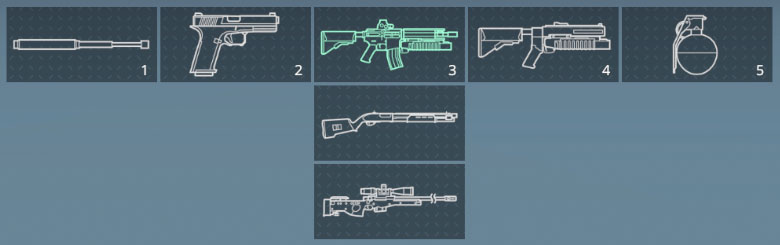
The stacked inventory emulates games like half-life with larger, more structured inventories than the older FPS games could manage. Weapons and items are organised into stacks. Each stack holds a specific type of weapon such as melee, pistols, heavy, thrown. Selecting the same slot multiple times cycles through the weapons in that group. The mouse wheel and previous / next weapon inputs cycle through each of the weapons in a stack before mmoving onto the previous / next stack slots. The order of the weapons within a stack is fixed.
The slot index of an item added to a stacked inventory must take the stack into account. The maximum stack size is 10. Slot indices 0-9 fall in the first stack, 10-19 in the second, 20-29 in the third, and so on.
The stacked inventory requires a different HUD setup to the others due to how it organises the items.
This inventory is also well suited to console based FPS games where, for example, each direction on the D-Pad is a stack.
The relevant assets for the stacked inventory can be found at the following locations:
- Assets\NeoFPS\Samples\SinglePlayer\Scenes\FeatureDemos\Inventory\FeatureDemo_InventoryStacked.unity for a demo scene using the inventory
- Assets\NeoFPS\Samples\SinglePlayer\Scenes\FeatureDemos\Inventory\Inventory_CharacterStackedInventory.prefab for a player character that uses the stacked inventory
- Assets\NeoFPS\Samples\Shared\Prefabs\Weapons\StackedInventory for the first person weapons and pickups/drops.
- Assets\NeoFPS\Samples\SinglePlayer\Scenes\FeatureDemos\Inventory\Inventory_HUDStacked.prefab for a replacement inventory HUD that is set up for stackedd inventories
To use the stacked inventory, your player character should have the FpsInventoryStacked behaviour attached to its root.
The stacked inventory accepts the basic FpsInventoryItem objects. For wieldables such as weapons, the prefabs should use the FpsInventoryWieldable behaviour. For quick use items such as quick throw weapons, your prefabs should use the FpsInventoryQuickUseItem behaviour. For instant use items such as instant heals you should use the FpsInventoryInstantUseItem behaviour. Each of the above will have a Quick Slot property that will correspond to their slot and stack position. Since stacked slots can contain ten items, a Quick Slot setting of 0-9 will mean the item sits in the first slot. 10-19 will sit in the second, and so on.
Swappable Inventory

The swappable inventory emulates FPS games that keep a constrained inventory such as 2 primary weapons, one melee and one throwable. This is a common inventory setup since more FPS games have started launching on console alongside or even ahead of PC.
The swappable inventory groups weapons and items into types similarly to the stacked inventory. A group can hold a fixed amount of weapons. If the group is full then the last selected weapon from that group is dropped when the character picks up another weapon of that type. In simple cases a group will only be able to hold a single weapon or item. A group can also be larger, and will encompass multiple quick slots. In this case, the order of weapons within the group is defined by the order they are dropped and picked up only.
The relevant assets for the swappable inventory can be found at the following locations:
- Assets\NeoFPS\Samples\SinglePlayer\Scenes\FeatureDemos\Inventory\FeatureDemo_InventorySwappable.unity for a demo scene using the inventory
- Assets\NeoFPS\Samples\SinglePlayer\Scenes\FeatureDemos\Inventory\Inventory_CharacterSwappableInventory.prefab for a player character that uses the swappable inventory
- Assets\NeoFPS\Samples\Shared\Prefabs\Weapons\SwappableInventory for the first person weapons and pickups/drops.
To use the swappable inventory, your player character should have the FpsInventorySwappable behaviour attached to its root.
The swappable inventory accepts the basic FpsInventoryItem objects. For wieldables such as weapons, the prefabs should use the FpsInventoryWieldableSwappable behaviour. For quick use items such as quick throw weapons, your prefabs should use the FpsInventoryQuickUseSwappableItem behaviour. For instant use items such as instant heals you should use the FpsInventoryInstantUseSwappableItem behaviour. Each of the above will have a Category property that dictates which quick slots it can sit in. If all the slots for that category are full then by default, the last selected item from that category will be dropped to make room for the new one.