FpsInventoryStacked MonoBehaviour
Overview
The stacked inventory groups items together into stacks. Selecting a stack multiple times cycles through the items in it. Similar to the inventory system in Half-Life.
Inspector
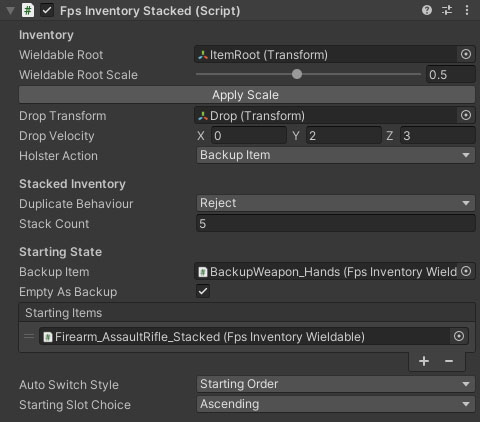
Properties
| Name | Type | Description |
|---|---|---|
| Wieldable Root | Transform | The transform to set as the parent of any objects added to the inventory. |
| Wieldable Root Scale | Float | A scale value for the wieldable root and any child items. Used to prevent weapons clipping into the scenery. |
| Drop Transform | Transform | A proxy transform used to set the drop position and rotation when a wieldable item is dropped. |
| Drop Velocity | Vector3 | The velocity of any dropped items relative to the character forward direction. |
| Holster Action | Dropdown | What should be selected when you holster your weapon. Options are Backup Item, Nothing. |
| Stack Count | Int | The number of available stacks. |
| Starting Slot Choice | Dropdown | The selection method for the starting slot. Options are Ascending, Descending, Custom Order and Backup Item. |
| Starting Order* | Int Array | This array specifies the selection order on start. The highest on the list that exists will be the starting selection. |
| Backup Item | FpsInventoryWieldable | An item to use if no wieldables are in the inventory. This could be empty hands or an infinite weapon such as a knife. |
| Empty As Backup | Boolean | This setting does not currently work with the stacked inventory. |
| Starting Items | FpsInventoryItem Array | A selection of inventory items to be added to the inventory on start. |
| Duplicate Behaviour | Dropdown | What to do when trying to add an item to the inventory that already exists. Options are Reject, DestroyOld, DropOld. |
| Swap Action | Dropdown | What to do when replacing an old item with a new one. Options are Drop, Destroy. |