FpsInventoryQuickUseItem MonoBehaviour
Overview
The FpsInventoryQuickUseItem behaviour is an inventory item that is used when selected and performs an action based on the attached wieldable. This can be a firearm, melee weapon, thrown weapon or wieldable tool. It is used for behaviours like quick-melee, quick-throw, quick-shoot or quick actions such as applying healing as a wieldable tool.
Inspector
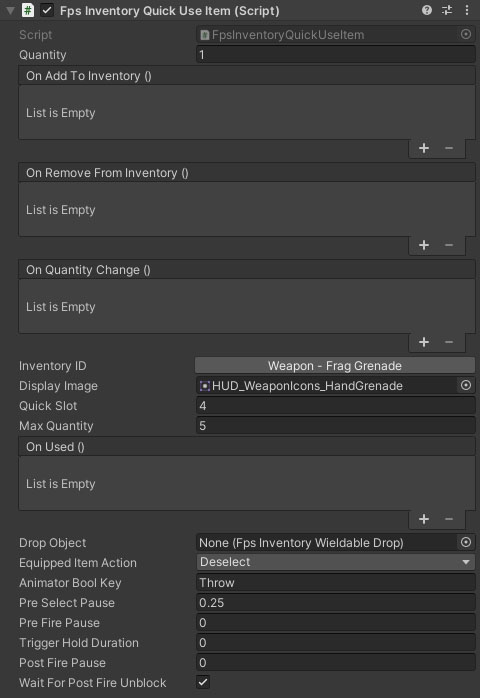
Properties
The FpsInventoryWieldable behaviour inherits from the FpsInventoryItem. Check the reference for information on its properties.
| Name | Type | Description |
|---|---|---|
| Inventory ID | ID Picker | The inventory item key. Clicking this button will open the inventory database item picker. |
| Display Image | Sprite | The image to use in the inventory HUD. |
| Quick Slot | Int | The quick slot the item should be placed in. If you are using a stacked inventory, remember that each stack is 10 slots (0-9 = stack 1, 10-19 = stack 2, etc). |
| Max Quantity | Int | The maximum quantity you can hold. |
| On Used | Unity Event | An event called when the item is used. |
| Drop Object | FpsInventoryWieldableDrop | The prefab to spawn when the wieldable item is dropped. |
| Equipped Item Action | Dropdown | What to do with the equipped item while performing the quick action. Deselect will deselect it before the action starts, and reselect after. AnimatorBool will block it and set a bool on its animator. |
| Animator Bool Key | String | The animator bool to set on the previously equipped item. You can use this to do things like lower one hand to use as part of this item. |
| Pre Select Pause | Float | The amount of time to wait before raising the weapon (this gives time for the currently equipped weapon to deselect). |
| Pre Fire Pause | Float | The amount of time after raising the weapon before starting the primary fire. |
| Trigger Hold Duration | Float | The length of time to hold the primary fire trigger for. |
| Post Fire Pause | Float | The time to wait after the weapon fires or performs its action before deselecting. |
| Wait For Post Fire Unblock | Boolean | Should the quick use item also wait for the weapon to register that it has completed its action before deselecting. |