FpsInventorySwappable MonoBehaviour
Overview
The swappable inventory groups items into categories. If the quick slots for a category are all full then picking up a new item of that category will drop the current or last accessed item of that category.
Inspector
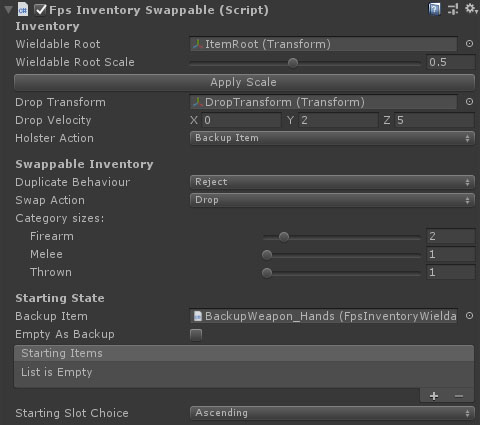
Properties
| Name | Type | Description |
|---|---|---|
| Wieldable Root | Transform | The transform to set as the parent of any objects added to the inventory. |
| Wieldable Root Scale | Float | A scale value for the wieldable root and any child items. Used to prevent weapons clipping into the scenery. |
| Drop Transform | Transform | A proxy transform used to set the drop position and rotation when a wieldable item is dropped. |
| Drop Velocity | Vector3 | The velocity of any dropped items relative to the character forward direction. |
| Swap Action | Dropdown | What to do when replacing an old item with a new one. Options are Drop, Destroy. |
| Holster Action | Dropdown | What should be selected when you holster your weapon. Options are Backup Item, Nothing. |
| Group Sizes | Int | The number of quick slots available for each category. The categories are defined in a generated constant called FpsSwappableCategory. Extending this constant will add new categories in the FpsInventorySwappable editor. |
| Starting Slot Choice | Dropdown | The selection method for the starting slot. Options are Ascending, Descending, Custom Order and Backup Item. |
| Starting Order* | Int Array | This array specifies the selection order on start. The highest on the list that exists will be the starting selection. |
| Backup Item | FpsInventoryWieldable | An item to use if no wieldables are in the inventory. This could be empty hands or an infinite weapon such as a knife. |
| Empty As Backup | Boolean | If this is true, then selecting an empty slot will switch to the backup item. |
| Starting Items | FpsInventoryItem Array | A selection of inventory items to be added to the inventory on start. |
| Duplicate Behaviour | Dropdown | What to do when trying to add an item to the inventory that already exists. Options are Reject, DestroyOld, DropOld, Allow. The last option will allow you to pick up multiple weapons of the same type. |