BodyTilt MotionGraphBehaviour
Overview
The BodyTilt behaviour tilts the character based on the specified tilt mode. Some example uses are:
- It is used in the parkour demo to tilt away from the wall by using the wall normal
- It is also used in the parkour demo to tilt back when crouch sliding by setting the mode to velocity, and the tilt angle to negative
- It is used to add a bob to the swimming in the swimming demo by setting the mode to velocity
Inspector
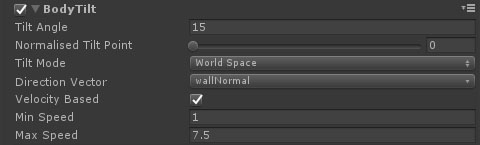
Properties
| Name | Type | Description |
|---|---|---|
| Tilt Angle | Float | The angle to tilt. |
| Normalised Tilt Point | Float | The point on the character to tilt from. 0 is the bottom, 1 is the top. |
| Tilt Mode | Dropdown | How the tilt direction is calculated:
|
| Direction Vector | Vector Parameter | The direction to tilt in. This property is only shown if the tilt mode is set to Character Relative or World Space. |
| Velocity Based | Boolean | If set then the tilt angle will be based on the speed of the character. |
| Min Speed | Float | The speed below which the tilt angle will be 0. |
| Max Speed | Float | The speed above which the tilt will reach the full tilt angle specified above. |