EnhancedRayCast MotionGraphCondition
Overview
The EnhancedRayCast condition performs a raycast from the specified point on the character. The cast results are output to motion graph parameters for later use.
Inspector
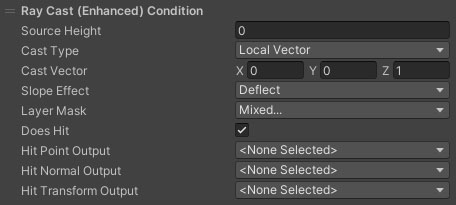
Properties
| Name | Type | Description |
|---|---|---|
| Source Height | Float | The point on the character capsule to cast from. 0 is the base of the capsule centerline. 1 is the top of the capsule centerline. |
| Cast Type | Dropdown | What to use for the cast vector. Available options are:
|
| Cast Vector | Vector3 | The direction and distance to cast. The vector does not have to be normalised, as the magnitude will be the maximum distance. Visible if Cast Type is set to World Vector or Local Vector. |
| Direction Parameter | VectorParameter | The direction to cast in. Only visible with Cast Vector set to one of the Parameter settings. |
| Distance | Float | The distance to cast. Only visible with Cast Vector set to one of the Parameter settings. |
| Slope Effect | Dropdown | How does the cast vector react to slopes. Deflect will deflect the cast vector up if it intersects with the ground plane. Project will project the vector onto the ground slope from above regardless whether the vector collides with the slope. Both only work if the character is grounded. None ignores the ground slope. |
| Layer Mask | Layermask | The layers to check against. |
| Does Hit | Boolean | Is the codition true if the cast hits something or does not. |
| Hit Point Output | Vector Parameter | An optional graph parameter to output the capsule cast hit point to. |
| Hit Normal Output | Vector Parameter | An optional graph parameter to output the capsule cast hit normal to. |
| Hit Transform Output | Transform Parameter | An optional graph parameter to output the capsule cast hit transform to. |