AdvancedParticleMuzzleEffect MonoBehaviour
Overview
The ParticleMuzzleEffect behaviour uses one or more particle systems which are played for each shot. On start, the systems are moved from the weapon to a specific transform in the character hierarchy so that the particles can persist when weapons are switched. This also allows you to simulate the particles in the character's coordinate space.
Inspector
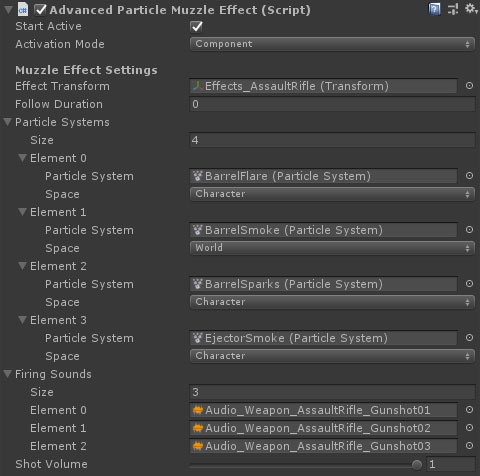
Properties
| Name | Type | Description |
|---|---|---|
| Start Active | Boolean | Should this module register as the active muzzle effect immediately on start. |
| Activation Mode | Dropdown | How does module activation work. Options are: Component means the component will be enabled / disabled - use this when you have multiple modules on an object such as the firearm root. GameObject activates / deactivates the object - use this for attachments where you want the geo to appear/disappear. |
| Effect Transform | Transform | The root of the muzzle effect hierarchy. |
| Particle Systems | Particle System Info Array | The particle system to play. |
| Firing Sounds | AudioClip Array | The audio clips to use when firing. Chosen at random. |
Particle System Info
| Name | Type | Description |
|---|---|---|
| Particle System | ParticleSystem | The particle system to play. |
| Space | Dropdown | The simulation space for the particles. World means that emitted particles move freely in the world, Weapon means that particles move relative to the weapon (if it moves, they move with it), Character moves with the character (handles rapid character movement better than world space), NoChange leaves the simulation space as defined in the particle system |