AnimOnlyAimer MonoBehaviour
Overview
The AnimOnlyAimer module triggers an animation, without moving the camera or weapon, or changing the crosshair. Its main use is when using the modular firearm system with AI.
Inspector
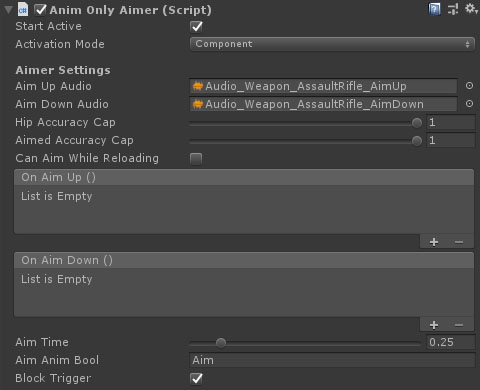
Properties
| Name | Type | Description |
|---|---|---|
| Start Active | Boolean | Should this module register as the active aimer immediately on start. |
| Activation Mode | Dropdown | How does module activation work. Options are: Component means the component will be enabled / disabled - use this when you have multiple modules on an object such as the firearm root. GameObject activates / deactivates the object - use this for attachments where you want the geo to appear/disappear. |
| Aim Up Audio | AudioClip | An audio clip to play when the weapon is raised. |
| Aim Down Audio | AudioClip | An audio clip to play when the weapon is lowered. |
| Hip Accuracy Cap | Float | The highest accuracy the firearm can achieve while not aiming down sights. |
| Aimed Accuracy Cap | Float | The highest accuracy the firearm can achieve while aiming down sights. |
| Can Aim While Reloading | Boolean | Should the weapon be lowered when reloading or can it stay aimed. |
| On Aim Up | UnityEvent | An event called when the weapon is fully raised. |
| On Aim Down | UnityEvent | An event called when the weapon is fully lowered. |
| Aim Time | Float | The time it takes to reach full aim, or return to zero aim. |
| Aim Anim Bool | String | The animator parameter key for a bool used to control aiming state in animations. |
| Block Trigger | Boolean | If true then the gun cannot fire while transitioning in and out of aim mode. This is used to prevent gunshots interrupting the animation. This property will only be shown if the Aim Anim Bool property is true. |