AutomaticTrigger MonoBehaviour
Overview
The AutomaticTrigger module fires continuously
Inspector
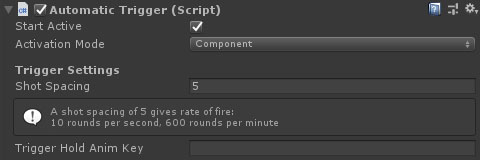
Properties
| Name | Type | Description |
|---|---|---|
| Start Active | Boolean | Should this module register as the active trigger immediately on start. |
| Activation Mode | Dropdown | How does module activation work. Options are: Component means the component will be enabled / disabled - use this when you have multiple modules on an object such as the firearm root. GameObject activates / deactivates the object - use this for attachments where you want the geo to appear/disappear. |
| Shot Spacing | Int | How many fixed update frames between shots. The info box below this show the rate of fire based on the shot spacing. |
| Trigger Hold Anim Key | String | The AnimatorController bool property key to set while the trigger is pressed. |