ChargedTrigger MonoBehaviour
Overview
The ChargedTrigger module charges up while the fire button is held down and fires once it hits full charge.
Inspector
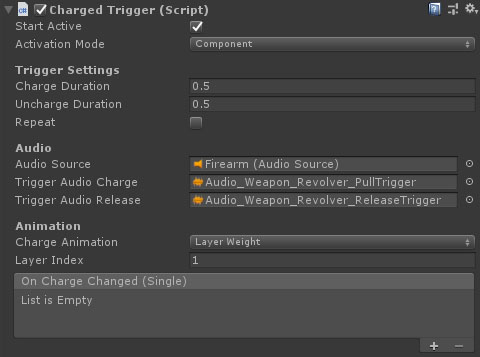
Properties
| Name | Type | Description |
|---|---|---|
| Start Active | Boolean | Should this module register as the active trigger immediately on start. |
| Activation Mode | Dropdown | How does module activation work. Options are: Component means the component will be enabled / disabled - use this when you have multiple modules on an object such as the firearm root. GameObject activates / deactivates the object - use this for attachments where you want the geo to appear/disappear. |
| Charge Duration | Float | How long does it take to charge the trigger. |
| Uncharge Duration | Float | How long does it take to uncharge the trigger, assuming it hasn't gone off. |
| Repeat | Boolean | Once the shot is fired, start charging the next shot if this is true. |
| Repeat Delay | Float | The time between a shot firing and starting charging the next shot. |
| Audio Source | AudioSource | The source to play the audio from (needs its own as it must be interrupted and seeked). |
| Trigger Audio Charge | AudioClip | The audio clip to play on charge. |
| Trigger Audio Release | AudioClip | The audio clip to play on release. |
| Charge Animation | Dropdown | How should the charge be animated. LayerWeight blends in a layer in the weapon's animator as charge increases. FloatParameter sets a float parameter value on the animator. EventsOnly fires an event when the charge changes, but does not affect the attached animator. |
| Layer Index | Integer | The animator layer index to blend in for the charge effect. This option will only be visible if "Charge Animation" is set to LayerWeight. |
| Charge Anim Key | String | The float animator parameter key to set when the trigger charge changes. This option will only be visible if "Charge Animation" is set to FloatParameter. |
| On Charge Changed | UnityEvent | An event fired each frame the charge changes. |