FirearmOverheat MonoBehaviour
Overview
The FirearmOverheat behaviour is used to model a simple heat accumulation in a gun as it shoots. It can also optionally cause the weapon to overheat and lock the trigger until it cools to a certain threshold.
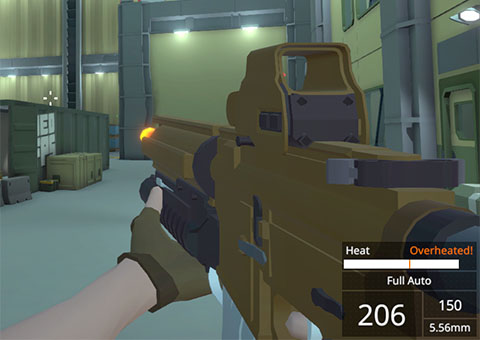
The glow effect requires that one of the NeoFPS glow shaders be used. These are found under the NeoFPS/Standard shader path, and are named based on their PBR surface type and glow type: GlowMetallic or GlowSpecular and Alpha Masked, Distance Masked and Position Masked.
- Alpha Masked uses a greyscale glow mask. Glow will be shown wherever the texture is not black, with full strength where it is white.
- Distance Masked specifies a 3D point (in object space), and the glow fades out based on the distance from that point.
- Position Masked sets start and end points on the object space z-axis, and the glow fades in and out between these points.
The haze effect requires a mesh renderer with a material using the NeoFPS/Standard/HeatHaze shader. This shader uses a property block to set the haze strength as the heat increases, and the object is disabled when the heat is zero. A simple haze effect can be created by combining a quad 3D geometry object with a BillboardOrientation Monobehaviour to keep it oriented at the first person camera. An example prefab can be found at NeoFPS/Samples/Shared/Effects/Prefabs/GunBarrelHazeBillboard.
Inspector
Properties
| Name | Type | Description |
|---|---|---|
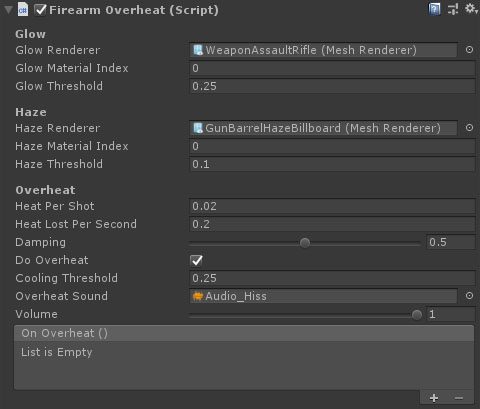
| Glow Renderer | MeshRenderer | The mesh renderer of the glow material. |
| Glow Material Index | Integer | The index of the glow material in the mesh renderer. |
| Glow Threshold | Float | The heat level (0 to 1) before the glow starts to appear. |
| Haze Renderer | MeshRenderer | The mesh renderer of the glow material. |
| Haze Material Index | Integer | The index of the haze material in the mesh renderer. |
| Haze Threshold | Float | The heat level (0 to 1) before the haze starts to appear. |
| Heat Per Shot | Float | The amount of heat to add with each shot of the weapon. When this reaches 1, the gun must cool down before it can fire again. |
| Heat Lost Per Second | Float | The amount of heat that is dissipated per second. The weapon will never overheat if this is higher than the heat per shot multiplied by rate of fire (rounds per second). |
| Do Overheat | Float | If true, then once the weapon reaches max heat the weapon will overheat, blocking the trigger until it has cooled down to a set threshold. |
| Cooling Threshold | Float | Once overheated, the weapon must cool to this heat level before it can fire again. |
| Overheat Sound | AudioClip | The audio clip to play once max heat is hit and the trigger is blocked. |
| Volume | Float | The volume to play the overheat sound at. |
| On Overheat | Float | An event that is fired when the heat hits the max level. |