MeleeWeapon MonoBehaviour
Overview
The MeleeWeapon behaviour is a hand held melee weapon like a club or knife.
Inspector
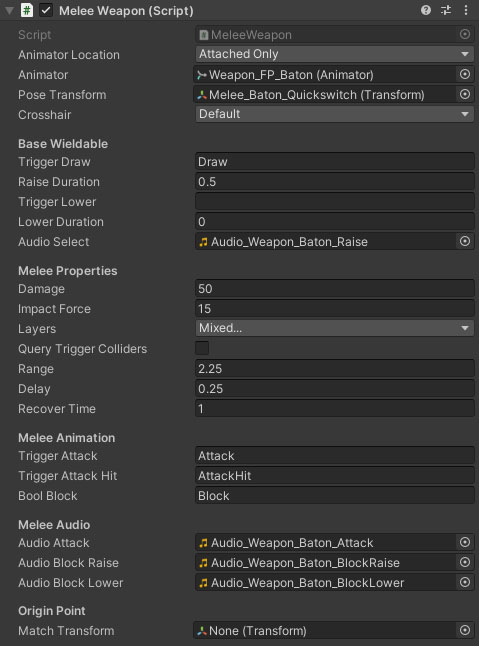
Properties
| Name | Type | Description |
|---|---|---|
| Animator Location | Dropdown | What animators should be exposed to the weapon components. Options are None, AttachedOnly, AttachedAndCharacter, MultipleAttached, MultipleAttachedAndCharacter and CharacterOnly. |
| Animator | Animator | The animator component of the weapon. |
| Pose Transform | Transform | The transform that should be offset for weapon poses. |
| Damage | Float | The damage the weapon does. |
| Impact Force | Float | The force to impart on the hit object. Requires either a Rigidbody or an impact handler on the hit object. |
| Layers | Float | The layers the attack will collide with. |
| Query Trigger Colliders | Boolean | Should the attack be tested against trigger colliders. |
| Range | Float | The range that the melee weapon can reach. |
| Delay | Float | The delay from starting the attack to checking for an impact. Should be synced with the striking point in the animation. |
| Recover Time | Float | The recovery time after a hit. |
| Crosshair | FpsCrosshair | The crosshair to show when the weapon is drawn. |
| Trigger Draw | String | The AnimatorController trigger key for the raise animation. |
| Raise Duration | Float | The time taken to raise the item on selection. |
| Trigger Lower | String | The AnimatorController trigger key for the weapon lower animation (blank = no animation). |
| Lower Duration | Float | The time taken to lower the item on deselection. |
| Trigger Attack | String | The AnimatorController trigger key for the attack animation. |
| Trigger Attack Hit | String | The AnimatorController trigger key for the attack hit animation. |
| Bool Block | String | The AnimatorController bool key for the block animation. |
| Audio Select | AudioClip | The audio clip when raising the weapon. |
| Audio Attack | AudioClip | The audio clip when attacking. |
| Audio Block Raise | AudioClip | The audio clip when bringing the weapon into block position. |
| Audio Block Lower | AudioClip | The audio clip when bringing the weapon out of block position. |
Origin Point
The NeoFPS weapons assume that the camera is placed at the origin. For many assets or 3rd party weapons, the origin is at the character feet or hips and the camera is a child object of the weapon's hierarchy. To align the object to correctly work with NeoFPS you can drag the camera object of the weapon into the Match Transform field under the Origin Point heading. This will move everything below the spring object to match up.