Melee Weapons
Overview
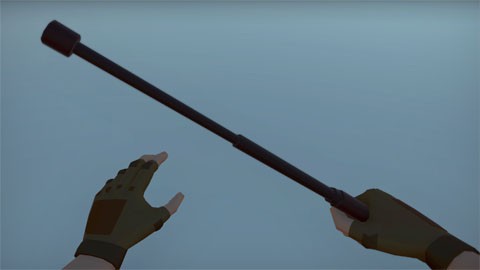
Melee weapons in NeoFPS are a limited range weapon that inflicts damage and impact force directly ahead when the animation is at the striking point.
The NeoFPS melee system is currently quite basic, and will be expanded with more options in future updates. You can extend it with your own custom behaviour via scripting as outlined below.
Wieldables vs Quick-Fire
The demo melee weapon is set up as wieldable. If a melee weapon is wieldable, that means it is equipped when selected, and then you have to hit the primary fire input to attack. You can achieve this with your melee weapons by adding an FpsInventoryWieldable or FpsInventoryWieldableSwappable behaviour to the root of your weapon prefab depending on your choice of inventory. These handle selection and deselection, and also define which quick-slot they apply to.
Alternatively, you can set up your melee weapons as quick-use items. This means that when you select them, the weapon will raise and then immediately attack before lowering again. This can be used alongside another equipped weapon (optionally interrupting its use). To achieve this, you would add an FpsInventoryQuickUseItem or FpsInventoryQuickUseSwappableItem behaviour to the root of your prefab instead of the wieldable behaviours above.
Weapon Pickups
You can create a pickup object for your melee weapon using the Pickup Wizard in the NeoFPS Hub. This allows you to pick the weapon up in the scene, but also to drop it from your hands and pick it up again later.
Melee Animations
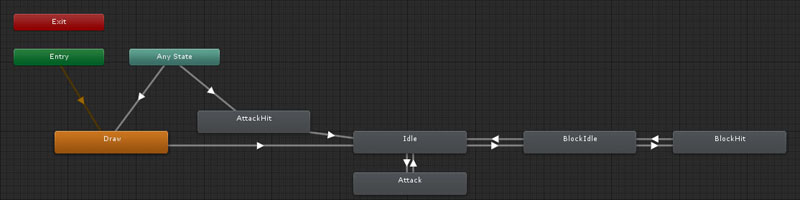
The melee weapon animations are relatively simple. See the sample assets for details on how the graph is set up.
The relevant animator controller properties are:
| Name | Type | Description |
|---|---|---|
| Draw | Trigger | Used when the weapon is drawn to raise it from off the screen. This is also the entry state of the controller. |
| Attack | Trigger | Signals the start of an attack. |
| Attack Hit | Trigger | Signals that the attack connected. This is used to trigger a bounce back reaction animation and will interrupt the attack animation that would otherwise follow through. |
| Block | Boolean | Used to specify when the weapon should be raised in a blocking state. |
| Block Hit | Trigger | A hit reaction knock while blocking. |
The property names can be changed in the MeleeWeapon behaviour.
Alongside keyframed animation, NeoFPS also allows you to add procedural animation to your weapons using Additive Transforms and Effects. These can be very simple, such as the weapon and head bob effects. They can also be more complicated, such as the procedural sprinting animation using the ProceduralMeleeSprintHandler. For larger scale movements, the main melee weapon behaviour has a pose system built in which allows for seamless transitions between poses and is used by the sprinting system along with the MeleeWieldableStanceManager.
Adding Custom Melee Behaviour
If you have custom behaviour that you want to be applied when you use a melee weapon, the easiest way is to add a "melee hit extension" component. This is simply a Monobehaviour that implements the IMeleeHitExtension interface. This interface has a single OnMeleeHit(RaycastHit hit) method. Any extension components that are found on the melee weapon's root object on start will be triggered every time you hit an object with the weapon.
If you actually want to change the hit behaviour, you can also create your own melee weapon class that inherits from the MeleeWeapon class. You can override the virtual OnMeleeHit(RaycastHit hit, Vector3 attackDirection) method here to either add or replace the functionality.
For more complex behaviour, you can also use the BaseMeleeWeapon class as a base for your own. This removes all the hit and block functionality, and exposes the following methods
public abstract void PrimaryPress();
public abstract void PrimaryRelease();
public abstract void SecondaryPress();
public abstract void SecondaryRelease();