PatternBallisticShooter MonoBehaviour
Overview
The PatternBallisticShooter module instantly fires in a preset pattern. The pattern is defined in 2D with a max distance of 1m from the origin on each axis. The distance setting specifies how far from the firearm's muzzle the full pattern size is achieved.
Pattern Editor
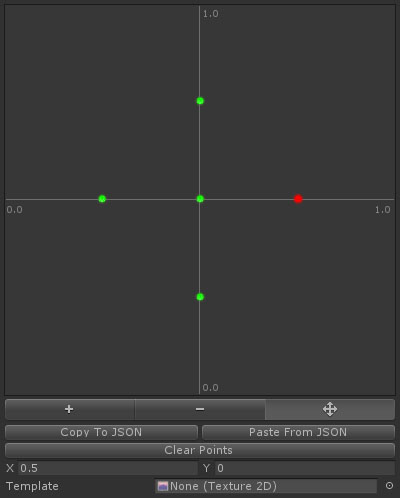
The pattern editor allows you to specify the gunshot pattern. The +, - and move buttons switch the editor mode. In + mode, clicking will add a new point. In - mode, clicking will remove the clicked point. In move mode, you can select a point by clicking it, and move a point by click-dragging it. The editor also has the following controls:
| Control | Description |
|---|---|
| Copy To JSON | Copy all points to the clipboard in JSON format. You can paste this to any text editor to make changes. |
| Paste From JSON | If the clipboard contains valid JSON, replace all the points with those on the clipboard. |
| Clear Points | Remove all points from the pattern. |
| Position | The position of the selected point (clamped to a -1 to 1 range on each axis). |
| Template | Load a background image to use as a template for placing points. |
Inspector
Properties
| Name | Type | Description |
|---|---|---|
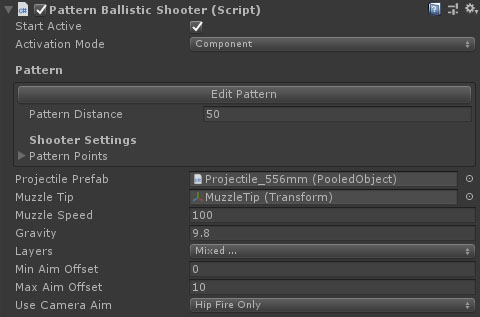
| Start Active | Boolean | Should this module register as the active shooter immediately on start. |
| Activation Mode | Dropdown | How does module activation work. Options are: Component means the component will be enabled / disabled - use this when you have multiple modules on an object such as the firearm root. GameObject activates / deactivates the object - use this for attachments where you want the geo to appear/disappear. |
| Pattern Distance | Float | The distance from the muzzle tip at which the pattern will match the diagram. |
| Pattern Points | Vector2 Array | The points that make up the pattern. |
| Projectile Prefab | PooledObject | The projectile to spawn. |
| Muzzle Tip | Transform | The transform that the bullet actually fires from. |
| Muzzle Speed | Float | The speed of the projectile. |
| Gravity | Float | The gravity for the projectile. |
| Layers | LayerMask | The physics collision layers the shot can hit. |
| Min Aim Offset | Float | The maximum angle from forward the shooter can fire when accuracy is 1. |
| Max Aim Offset | Float | The maximum angle from forward the shooter can fire when accuracy is 0. |
| Use Camera Aim | Dropdown | When set to use camera aim, the gun first casts from the FirstPersonCamera's aim transform, and then from the muzzle tip to that point to get more accurate firing. Options are: HipFireOnly, HipAndAimDownSights, AimDownSightsOnly, Never. |