RenderTextureScope MonoBehaviour
Overview
The RenderTextureScope is used to model a weapon scope using a separate camera attached to the weapon. The shader provided with NeoFPS provides parallax effects that move the scope ring and reticule as the camera viewing the scope lens goes off the scope's axis, and fades the lens to an opaque glass at the extremes (disabling the scope camera when fully opaque. Render texture based scopes incur a performance penalty because they require rendering the scene twice, along with communicating back and forth with the GPU each frame.
Inspector
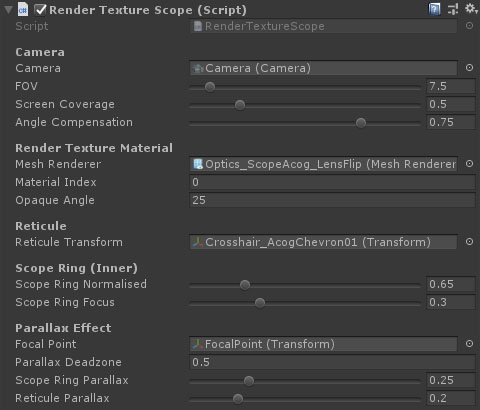
Properties
The RenderTextureScope properties are split into a number of sections:
Camera
| Name |
Type |
Description |
| Camera |
Camera |
The scope camera. |
| FOV |
Float |
The field of view for the scope camera. |
| Screen Coverage |
Float |
The amount of the screen height the scope takes up (multiplier). Smaller screen coverage needs a smaller render texture and therefore performs better. |
| Angle Compensation |
Float |
Rotate the camera to adapt to the parallax effect. At 1, the image will track (roughly) with the scope ring. At 0, the scope ring will be completely detached from the image. |
Render Texture Material
| Name |
Type |
Description |
| Mesh Renderer |
MeshRenderer |
The mesh renderer of the scope lens which will receive the render texture. |
| Material Index |
Integer |
The material index is used to specify which material to modify from a multi-part mesh. |
| Opaque Angle |
Float |
The angle in degrees off the axis of the scope where the camera stops rendering and the material becomes completely opaque. |
Reticule
| Name |
Type |
Description |
| Reticule Transform |
Transform |
The transform of the reticule geometry. Local position (0,0,0) should be centered on the camera and slightly in front. |
Scope Ring (Inner)
| Name |
Type |
Description |
| Scope Ring Normalised |
Float |
The start of the scope ring in terms of the normalised radius. At 1, the ring is a circle that touches the edges of the texture. |
| Scope Ring Focus |
Float |
The focus level of the scope ring. Setting this lower will expand the blur of the ring out from the normalised start radius. |
Parallax Effect
| Name |
Type |
Description |
| Focal Point |
Transform |
A transform that represents the lens of the scope that the player looks into. Used to determine the off-axis angle for parallax and fade. This should be placed near the lens of the scope. |
| Parallax Deadzone |
Float |
An angle range from the scope axis where there is no parallax. This prevents the reticule from going off center during small movements like idle animations or procedural breathing. |
| Scope Ring Parallax |
Float |
The amount of parallax to add to the scope ring as the eye-line moves away from the scope axis. |
| Reticule Parallax |
Float |
The amount of parallax to add to the reticule as the eye-line moves away from the scope axis. Values above the scope ring parallax will make the reticule seem like it is further forward than the ring. |
See Also
Modular Firearms
Scopes & Optics