WeaponMoveAimer MonoBehaviour
Overview
The WeaponMoveAimer module moves the entire weapon up to align the center of the camera with the weapon sights.
In The Scene View
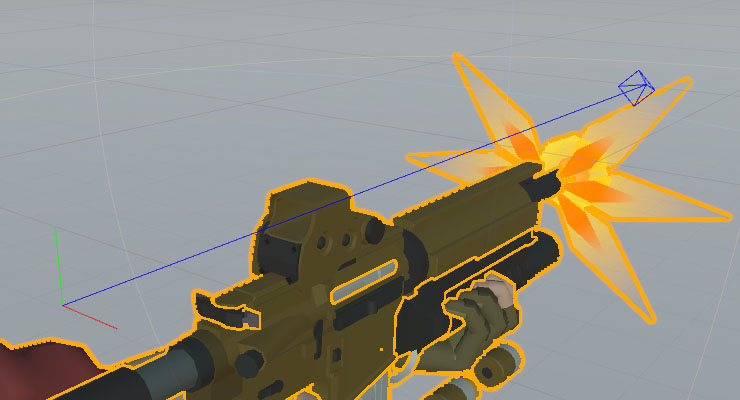
With a gameobject selected that uses a HeadMoveAimer component, the aimer guide handle will be visible in the scene view. This is used to represent the aim point of the aimer, with the blue arrow pointing forwards, and the green arrow pointing up.
Inspector
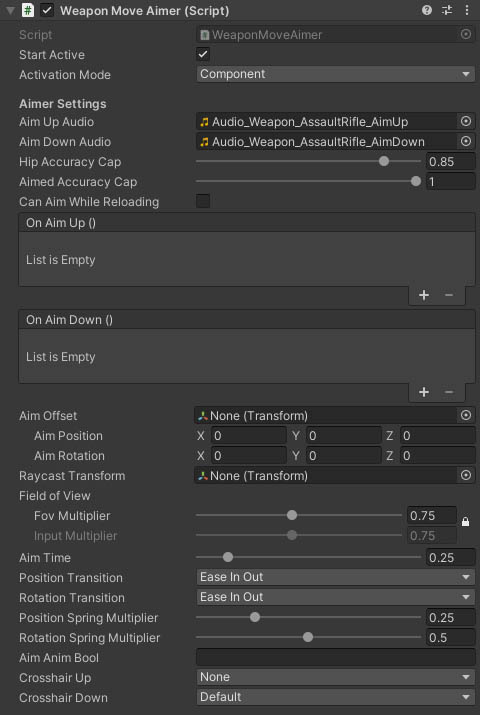
Properties
| Name | Type | Description |
|---|---|---|
| Start Active | Boolean | Should this module register as the active aimer immediately on start. |
| Activation Mode | Dropdown | How does module activation work. Options are: Component means the component will be enabled / disabled - use this when you have multiple modules on an object such as the firearm root. GameObject activates / deactivates the object - use this for attachments where you want the geo to appear/disappear. |
| Aim Up Audio | AudioClip | An audio clip to play when the weapon is raised. |
| Aim Down Audio | AudioClip | An audio clip to play when the weapon is lowered. |
| Hip Accuracy Cap | Float | The highest accuracy the firearm can achieve while not aiming down sights. |
| Aimed Accuracy Cap | Float | The highest accuracy the firearm can achieve while aiming down sights. |
| Can Aim While Reloading | Boolean | Should the weapon be lowered when reloading or can it stay aimed. |
| On Aim Up | UnityEvent | An event called when the weapon is fully raised. |
| On Aim Down | UnityEvent | An event called when the weapon is fully lowered. |
| Aim Offset | Transform | A target aim transform. The weapon will be moved to align this transform to the camera when aiming down sights. Offsets are calculated on Awake, so moving this transform at after this point has no effect. |
| Aim Position | Vector3 | The offset for the weapon transform to move to align the weapon sights with the camera. This property will only be visible if no AimOffset transform is set. |
| Aim Rotation | Vector3 | An euler angle offset for the weapon to move to align the weapon sights with the camera. This property will only be visible if no AimOffset transform is set. |
| Raycast Transform | Transform | An optional transform that will be used for raycasting weapon shots when aiming down sights (not using the camera aim transform). This ensures bullets hit exactly on the aim point when the optics are positioned above the barrel. |
| Fov Multiplier | Float | A multiplier for the camera FoV for aim zoom. |
| Input Multiplier | Float | A multiplier for the camera input when aiming down sights. By default, this value is locked to the FoV multiplier. Clicking the lock icon next to the 2 multipliers allows you to modify it separately for situations such as render texture scopes. |
| Aim Time | Float | The time it takes to reach full aim, or return to zero aim. |
| Transition | Dropdown | The transitions easing to apply. Note: custom transition requires inheriting a new class and overriding the custom transition methods. Lerp moves between states with uniform speed, SwingUp moves across and then up, SwingAcross moves up and then across, EaseInOut smoothes the beginning and end of the transition for a more natural feel, Overshoot moves past the target position and then back, OvershootIn overshoots when raising the weapon, but with a smoother return to lowered, Spring overshoots and wobbles back to position, SpringIn has a smoother return to lowered position, Bounce bounces off the target pose briefly, BounceIn has a smoother return to lowered, Custom uses virtual methods which you can override in a custom script. |
| Position Spring Multiplier | Float | A multiplier for procedural spring position animation on the weapon. Used to reduce movement when the firearm is close to the camera. |
| Rotation Spring Multiplier | Float | A multiplier for procedural spring rotation animation on the weapon. Used to reduce movement when the firearm is close to the camera. |
| Aim Anim Bool | String | The animator parameter key for a bool used to control aiming state in animations. |
| Block Trigger | Boolean | If true then the gun cannot fire while transitioning in and out of aim mode. This is used to prevent gunshots interrupting the animation. This property will only be shown if the Aim Anim Bool property is true. |
| Crosshair Up | FpsCrosshair | The crosshair to show when aiming down sights. |
| Crosshair Down | FpsCrosshair | The crosshair to show when not aiming down sights. |