WieldableTool MonoBehaviour
Overview
The WieldableTool behaviour is used to create tools and items that are equipped and used in a character's hands. They have both a primary and secondary fire, and are built out of modules and actions.
Inspector
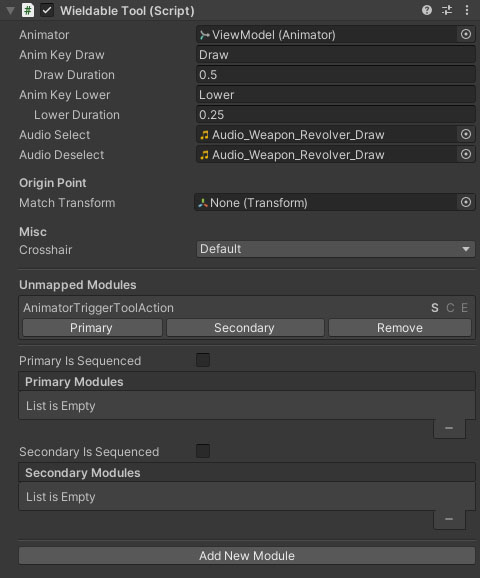
Properties
| Name | Type | Description |
|---|---|---|
| Animator Location | Dropdown | What animators should be exposed to the weapon components. Options are None, AttachedOnly, AttachedAndCharacter, MultipleAttached, MultipleAttachedAndCharacter and CharacterOnly. |
| Animator | Animator | The animator component of the tool. |
| Pose Transform | Transform | The transform that should be offset for weapon poses. |
| Anim Key Draw | String | The key for the AnimatorController trigger property that triggers the draw animation. |
| Draw Duration | Float | The time it takes to raise the tool. This option will only be visible when the anim key is set. |
| Anim Key Lower | String | The AnimatorController trigger key for the tool lower animation (blank = no animation). |
| Lower Duration | Float | The time taken to lower the item on deselection. This option will only be visible when the anim key is set. |
| Audio Select | AudioClip | The audio clip when raising the tool. |
| Audio Deselect | AudioClip | The audio clip when lowering the tool. |
| Crosshair | [FpsCrosshair][3] | The crosshair to show when the weapon is drawn. |
| Primary Is Sequenced | Boolean | Do the primary actions play out in a sequence (eg play animation then heal) or are they active for the duration the button is held (eg grapple rope). |
| Secondary Is Sequenced | Boolean | Do the secondary actions play out in a sequence (eg play animation then heal) or are they active for the duration the button is held (eg grapple rope). |
Unmapped Modules
The unmapped modules are the tool modules and actions that exist on this object but have not yet been assigned to either the primary fire. The buttons will assign the module to the relevant fire mode, or remove it from the object.
Primary and Secondary Modules
The primary and secondary modules array assign each of the attached modules to either the primary or secondary fire modes, including specifying the order they trigger. The S, C and E characters specify whether the module's actions are triggered on the fire mode's start (S), end (E) or continuously while the trigger is held (C). A number of modules have options you can set for which they should use.
Add New Module
The "Add New Module" button is a fast way to add a module component to the tool. Clicking it will list all the available module types for you to choose from.
Origin Point
The NeoFPS weapons assume that the camera is placed at the origin. For many assets or 3rd party weapons, the origin is at the character feet or hips and the camera is a child object of the weapon's hierarchy. To align the object to correctly work with NeoFPS you can drag the camera object of the weapon into the Match Transform field under the Origin Point heading. This will move everything below the spring object to match up.