WieldableToolStanceManager MonoBehaviour
Overview
The WieldableToolStanceManager behaviour is used to specify poses or stances for a wieldable tool. The entire tool will be moved to match the stance, and can optionally set an animator bool parameter too.
The stance will be temporarily exited when aiming and reloading.
Inspector
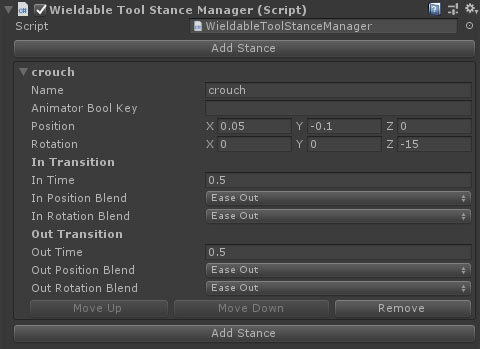
Properties
Use the Add Stance buttons to add a new stance to the manager.
Stances
Individual stances have the following properties:
| Name | Type | Description |
|---|---|---|
| Name | String | The name of the stance. |
| Animator Bool Key | String | An optional name of a bool parameter in the weapon's Animator. |
| Position | Vector | The position to move the weapon to in this stance. |
| Rotation | Vector | The rotation of the weapon in this stance. |
| In Position Blend | Dropdown | The easing method for blending between the source position and stance position on entering the stance. Options are: **Lerp, EaseIn, EaseOut, EaseInOut, SwingAcross, SwingUp, Spring, Bounce and Overshoot. |
| In Rotation Blend | Dropdown | The easing method for blending between the source rotation and stance rotation on entering the stance. Options are: **Lerp, Slerp, EaseIn, EaseOut, EaseInOut, Spring, Bounce, Overshoot. |
| In Time | Float | The time taken to enter the stance. |
| Out Position Blend | Dropdown | The easing method for blending between the stance position and idle position on exiting the stance. Options are: **Lerp, EaseIn, EaseOut, EaseInOut, SwingAcross, SwingUp, Spring, Bounce and Overshoot. |
| Out Rotation Blend | Dropdown | The easing method for blending between the stance rotation and Idle rotation on exiting the stance. Options are: **Lerp, Slerp, EaseIn, EaseOut, EaseInOut, Spring, Bounce, Overshoot. |
| Out Time | Float | The time taken to enter the stance. |