FirstPersonCharacterArms MonoBehaviour
Overview
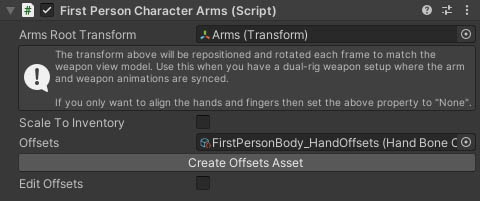
The FirstPersonCharacterArms behaviour is used on a character's arms to match animations to a WieldableItemKinematics component on the character's selected weapon. There are 2 approaches to this based on whether the arms that are attached to the character have a full body and animations synced with the weapon. If the character has a full body then the Arms Root Transform property should be kept empty, and the arms will have their hand and finger positions matched using IK. If the arms do not have a full body and they use their own animations that are synced to the weapon, then you should set the Arms Root Transform to point to the root of the arms and it will be repositioned to match an equivalent transform on the weapon each frame.
Inspector
Properties
| Name | Type | Description |
|---|---|---|
| Arms Root Transform | Transform | An optional arms transform that should be matched to the weapon geometry. Use this to match arm animations to weapon animations after the weapon has been affected by procedural animation effects such as bob or poses, but only if the character does not have a full body and arms and weapon have synced animations. |
| Scale To Inventory | Boolean | Should the arms root transform be scaled to match the inventory scale. |
| Offsets | HandBoneOffsets | An offsets asset to help align character hands and fingers to weapon targets. The hand matching uses a standardised set of axes for hands, and you can apply offsets to both the character and weapon arms to match the standard. These will then be merged to get direct rotations from weapon to character when the weapon is equipped. For more information see First Person Body. |