WieldableItemKinematics MonoBehaviour
Overview
The WieldableItemKinematics behaviour is used to specify hand and finger properties on a weapon or wieldable item that the character's FirstPersonCharacterArms should IK match character hands and fingers to. It can be used with either generic or humanoid rigs on the wieldable, but the character must use a humanoid rig for IK to work.
Inspector
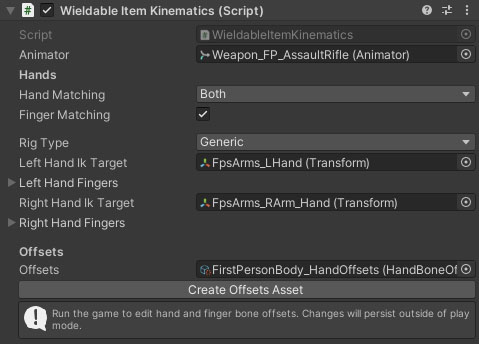
Properties
| Name | Type | Description |
|---|---|---|
| Animator | Animator | The wieldable's animator component. |
| Hand Matching | Dropdown | Which hand positions and rotations should be matched (using IK). Options are None, Left, Right, Both. |
| Finger Matching | Boolean | Should finger rotations be matched. |
| Rig Type | Dropdown | What type of animation rig does the weapon use. Options are Generic and Humanoid. A generic rig requires you to specify which objects represent the hand and finger bones. |
| Left Hand Ik Target | Transform | The target transform the character's left hand should align to. |
| (Left Hand Fingers) | Transform Array | A list of finger transforms for the left hand. |
| Right Hand Ik Target | Dropdown | The target transform the character's right hand should align to. |
| (Right Hand Fingers) | Transform Array | A list of finger transforms for the right hand. |
| Offsets | HandBoneOffsets | An offsets asset to help align character hands and fingers to weapon targets. Offsets can be edited below when in play mode and changes will persist to edit mode. |
The Create Offsets button will create a HandBoneOffsets at the location of the weapon prefab using its name as a basis. It will then assign the offsets asset to the Offsets property above.
If you have a weapon selected in the player character hierarchy at runtime then the inspector will embed the properties of the attached HandBoneOffsets asset for you to edit in place. Changing its properties will change the hand position and rotation, and finger rotations in the scene view, and changes will persist when exiting play mode. You can also modify the properties on the asset directly to see the changes in the scene view. An offset asset can be shared between multiple weapons if they all use the same hand rig, or created per weapon if not.