FirstPersonCharacterAnimationProfile Scriptable Object
Overview
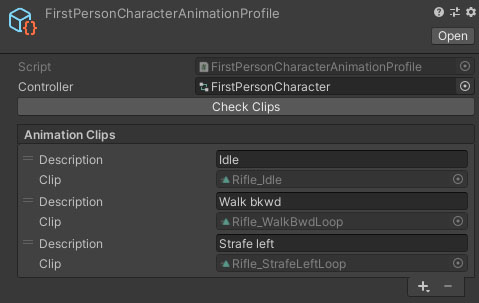
The FirstPersonCharacterAnimationProfile scriptable object asset is used to filter which animations on a character are exposed for overriding, as well as allowing more descriptive names. Attach the animator controller that you want to use and you can then add animation clips to the list below.
Inspector
Properties
| Name | Type | Description |
|---|---|---|
| Controller | Animator Controller | The animator controller that you want to search through and expose animation clips from. |
The Check Clips button is used if you are actively modifying the animator controller that you have assigned to this profile. It will re-scan the available animation clips and check the clips you have added to the profile.
The Animation Clips list contains each clip that you are exposing to components that consume this profile. To add a new clip, click the + button at the bottom. To remove a clip, select the entry in the list and hit the - button. Each element inthe list has the following properties:
| Name | Type | Description |
|---|---|---|
| Description | String | The name for the clip that will be shown when choosing overrides in a component that consumes these profiles such as the WieldableItemBodyAnimOverrides component. |
| Clip | Animation Clip | The animation clip that you are exposing to be overridden. This value cannot be changed. |