Motion Graph Conditions
Overview

Conditions are simple true/false checks that are used to specify when the motion graph changes its active state. Conditions can be far reaching, checking against the graph, the controller, the wider character, or any external system. Connections can transition when a single condition is met or when all conditions in a connection are met.
A connection can also be muted, which means its conditions will be ignored and it will never be traversed. A muted connection will appear red in the motion graph editor viewport.
Condition Groups
Condition groups are used to evaluate conditions together and allow for more complex rules than just "any" and "all".
For example, when swimming on the surface of a water zone, you might transition to the underwater state if you either press crouch or look down and press forwards. In this situation you would set the main connection to transition on any of: crouch is pressed or the Move Down condition group is true. The Move Down condition group will be set to be true if all of: the character is looking down and the player is pressing forward.
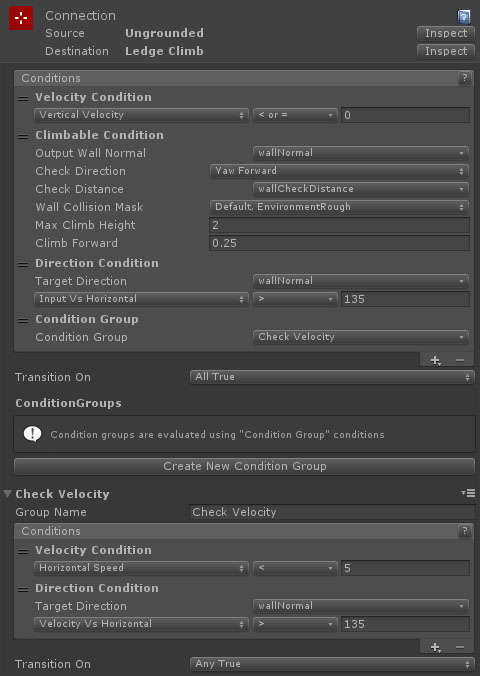
The above connection is used for checking if a character can climb a wall. It is set up with a condition group that checks if either the horizontal character speed is low or the direction of movement is directly into the wall (within a certain angle range).
The results of a condition group are recorded when evaluated (reset each frame). This prevents infinite loops where 2 condition groups reference each other.
Conditions
The following conditions are available:
Graph Conditions
These are conditions that check against the graph state.
| Name | Description |
|---|---|
| CompletedCondition | Checks if the state it is connected from has its complete flag set. |
| ConditionGroupCondition | Used to evaluate multiple conditions together (see above). |
| DebugCondition | Used to debug connections by specifying the value and outputting a message to the debug log. |
| ElapsedTime | Checks if the state it is connected from has been active for a set period. |
Parameter Conditions
These are conditions that check against the [parameters][3] attached to the graph.
| Name | Description |
|---|---|
| CompareFloatsCondition | Compares two float parameters attached to the graph. |
| CompareIntsCondition | Compares two int parameters attached to the graph. |
| CompareSwitchesCondition | Compares two switch parameters attached to the graph. |
| CompareTime | Compares the current time with the time stored in a float parameter attached to the graph. |
| FloatCondition | Compares a float parameter attached to the graph to a specific value. |
| IntCondition | Compares an int parameter attached to the graph to a specific value. |
| SwitchCondition | Compares a switch parameter attached to the graph to a specific value. |
| TransformCondition | Compares a transform parameter attached to the graph to a specific value. |
| TriggerCondition | Compares if a trigger parameter attached to the graph has been triggered. |
| VectorCondition | Compares a vector parameter or its components attached to the graph to a specific value. |
| [VectorTypeCondition][param11] | Checks if a vector parameter attached to the graph matches a certain type of vector such as zero length or wall vector. |
Physics Conditions
These conditions use the physics system to check for collisions and contacts.
| Name | Description |
|---|---|
| CapsuleCast | Casts the character capsule to check for a collision. |
| CapsuleCast (Enhanced) | Casts the character capsule to check for a collision and can store the results in parameters. |
| CapsuleLookahead | Casts the character capsule based on its movement. |
| CapsuleLookahead (Enhanced) | Casts the character capsule based on its movement and can store the results in parameters. |
| Climbable | Checks if a wall has an unobstructed climbable ledge within a certain height. |
| RayCast | Performs a ray cast ffrom a point on the character. |
| RayCast (Enhanced) | Performs a ray cast from a point on the character and can store the results in parameters. |
| RayLookahead | Performs a ray cast based on the movement of the character. |
| RayLookahead (Enhanced) | Performs a ray cast based on the movement of the character and can store the results in parameters. |
| SphereCast | Performs a sphere cast from a point on the character. |
| SphereCast (Enhanced) | Performs a sphere cast from a point on the character and can store the results in parameters. |
| SphereLookahead | Performs a sphere cast based on the movement of the character. |
| SphereLookahead (Enhanced) | Performs a sphere cast based on the movement of the character and can store the results in parameters. |
Character Conditions
These conditions interface with the character that is controlled by the graph.
| Name | Description |
|---|---|
| AirTime | Checks how long the character has been ungrounded. |
| CharacterHeight | Checks the character capsule height or height multiplier (from standing). |
| CollisionFlags | Checks the collision flags generated on the last movement frame. |
| Direction | Checks the character's aim, input or movement direction. |
| GroundContact | Checks if the character is touching the ground. |
| GroundNormal | Tests against the normal vector of the ground contact. |
| GroundSurfaceNormal | Tests against the normal vector of the ground surface at the contact point. If the contact is an edge, this will be the normal of the top face connected to that edge. |
| HeightRestriction | Checks if the character can reach a specific height (eg trying to stand while crouched in an air vent. |
| InputVector | Checks against the input vector provided to the motion controller. |
| InventoryItem | Checks the number of inventory items with a specific ID in the character's inventory against a certain value. |
| Pitch | Checks the character's aim pitch. |
| ScriptedComponent | Paired with a component attached to the character that implements the IScriptedComponentCondition interface. |
| Velocity | Checks the character's velocity in various directions. |
| Water | Checks the character's position relative to a water zone. |
| Wieldable Selected | Checks if the character has a specific wieldable inventory item and whether they have it selected. |