MotionController Behaviour
Overview
The MotionController is the workhorse of the MotionGraph system. It handles the actual movement of the character, ticks the motion graph, and sends input and information to the motion graph that it needs to react to the player and environment.
Inspector
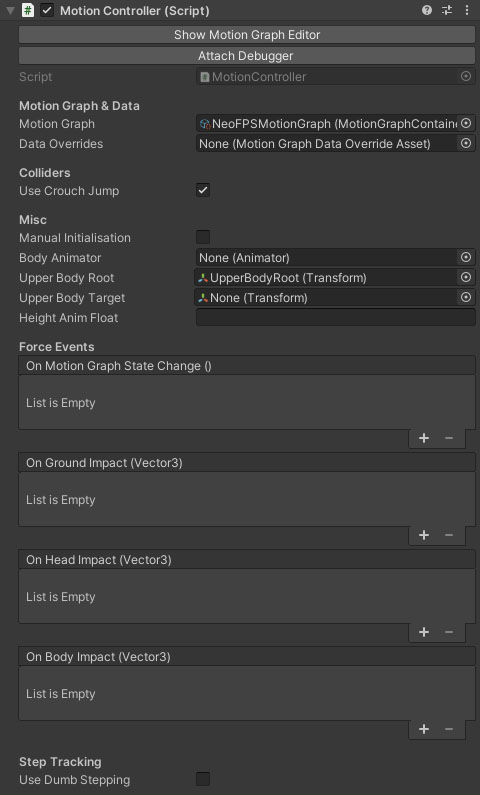
The Show Motion Graph Editor button will show the motion graph editor, with this controller's motion graph opened for editing. If the controller is attached to a character in the scene and the game in play mode, then the opened graph will update at runtime to show the current state.
The Attach Debugger button will open the motion debugger and attach the character to start recording its movement details.
Properties
Motion Graph & Data
| Name | Type | Description |
|---|---|---|
| Motion Graph | MotionGraph | The motion graph for the controller to use (a unique instance will be instantiated from this). |
| Override | MotionGraphDataOverrideAsset | The motion data override for the controller to use. |
Colliders
| Name | Type | Description |
|---|---|---|
| Use Crouch Jump | Boolean | If this is enabled, then the collider will provide an offset that can be used to give extra height to a jump so it appears the legs are tucked up instead of the head ducked down. |
Misc
| Name | Type | Description |
|---|---|---|
| Manual Initialisation | Boolean | Should the component be initialised manually or automatically in Awake and Start? Switch this on for things like networked players. |
| Body Animator | Animator | An optional animator component for the character body. This allows motion graph states and behaviours to easily drive animations. |
| Upper Body Root | Transform | (Required) The root transform of the head heirarchy (height interpolated when crouching, or matched to animator hierarchy). This property was formerly called UpperBodyRoot. |
| Upper Body Target | Transform | (Required if the character has a body) A bone in the character's skeleton that's used as a target for the head root. |
| Height Anim Float | Transform | (Required if the character has a body) The name of the float parameter in the character body's animator controller that is used to control the character height blend. |
Force Events
| Name | Type | Description |
|---|---|---|
| On Motion Graph State Change | UnityEvent | This event is called whenever the controller graph state changes (only includes the end state when traversing multiple states in the graph). |
| On Ground Impact | UnityEvent | This event is called when the controller first contacts the ground after being airborne. Parameters = Vector3 impulse, float mass |
| On Head Impact | UnityEvent | This event is called whenever the top of the controller capsule makes initial contact with a collider. Parameters = Vector3 impulse, float mass |
| On Body Impact | UnityEvent | This event is called whenever the sides of the controller capsule makes initial contact with a collider. Parameters = Vector3 impulse, float mass |
Step Tracking
| Name | Type | Description |
|---|---|---|
| Use Dumb Stepping | Boolean | Switch this to true if you aren't tracking steps in the motion graph, and they will simply be counted at a default rate whenever the character is grounded. |