FootstepAudio MotionGraphBehaviour
Overview
The FootstepAudio behaviour plays footsteps based on the character speed and the ground surface below them.
Inspector
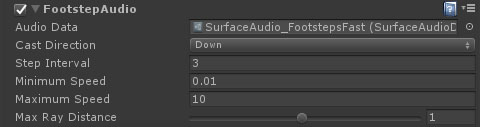
Properties
| Name | Type | Description |
|---|---|---|
| Audio Data | SurfaceAudioData | The surface audio library for the slide audio clips. |
| Cast Direction | Dropdown | The direction to perform the footstep surface check. Available options are:
|
| Cast Vector | Vector3 | The direction to cast in for footstep surface checks. |
| Vector Parameter | VectorParameter | A vector parameter containing the direction vector to cast in for footstep surface checks. |
| Step Interval | Float | The interval between steps. Higher numbers mean the steps are further apart. |
| Minimum Speed | Float | The speed below which no footstep audio will be played. |
| Maximum Speed | Float | The maximum speed that the actual speed will be clamped to. Prevents rapid fire footsteps. |
| Max Ray Distance | Float | The downward raycast length for the ground surface test. |
| Ray Offset | Float | The vertical offset above the absolute bottom of the character collider to start the downward surface test. |