Falling MotionGraphState
Overview
The falling state behaves as the name suggests, but provides some level of control when in the air.
Inspector
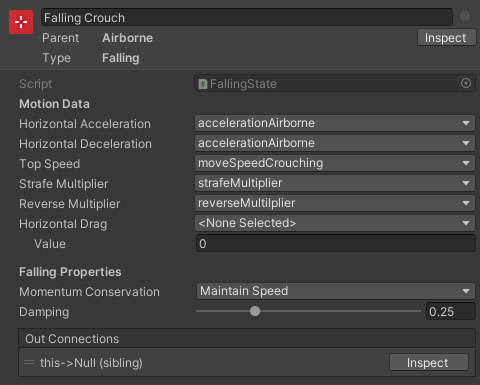
Properties
| Name | Type | Description |
|---|---|---|
| Horizontal Acceleration | Float Data | The input driven acceleration while falling. This can either be set as a value, or by referencing a float data entry. |
| Horizontal Deceleration | Float Data | The input driven deceleration while falling (if input is zero or less than previous). This can either be set as a value, or by referencing a float data entry. |
| Top Speed | Float Data | The top horizontal movement speed (for keyboard input or max analog input). This can either be set as a value, or by referencing a float data entry. |
| Strafe Multiplier | Float Data | The multiplier applied to the max movement speed when strafing. This can either be set as a value, or by referencing a float data entry. |
| Reverse Multiplier | Float Data | The multiplier applied to the max movement speed when moving in reverse. This can either be set as a value, or by referencing a float data entry. |
| Horizontal Drag | Float Data | A drag deceleration applied to horizontal movement. This can either be set as a value, or by referencing a float data entry. |
| Clamp Speed | Boolean | Should the speed of the character decelerate to top speed. |
| Momentum Conservation | Dropdown | Should the speed of the character decelerate to top speed if going faster. Options are MaintainSpeed (the speed will not be modified), ClampSpeed (the speed will be clamped to top speed if no input, or the input target speed if there is) and ClampToInput (the speed will decelerate to zero if no input, or be clamped to the input target speed if there is). |
| Damping | Float | The amount of damping to apply when changing direction. |