Motion Graph States
Overview
States are the building blocks of the motion graph. Each state is a style of movement. It takes input and basic physics information from the MotionController and returns a move vector each tick.
Included States
Ground Movement States
| Name |
Description |
| AnimCurveDash |
A basic grounded movement with a dash layered on top. The dash speed is controlled with an animation curve. |
| Dash |
Surge in a direction based on yaw or movement direcion. |
| Movement |
Standard ground based movements such as walking or running. |
| Ski |
Maintain ground speed and allow steering based on speed (slower speed is tighter steering). |
| Steep Slide |
Sliding on a steep slope, with some control over direction. |
Airborne States
| Name |
Description |
| Controlled Jetpack |
Applies an upward force, with some air control. |
| Falling |
Air control based movement with gravity. |
| Fly |
No-clip style movement that can move in all axes. |
| Jetpack |
Applies an upward force and maintains horizontal velocity. |
Instantaneous States
| Name |
Description |
| Boost Pad |
Instantly sets velocity to match a vector parameter. |
| Dodge |
As jump, but lower and further. |
| Impulse |
Instantly sets velocity based on a vector with options for space and ground alignment. |
| Jump |
An instant upward jump. Completes in one frame. |
| JumpDirection |
A jump, but the direction is rotated from the vertical based on input. |
| JumpDirectionV2 |
A jump with a fixed vertical speed and a horizontal speed based on input. |
| Push Off |
Applies velocity based on a vector parameter, with optional upward force. |
| Repulse |
An instant impulse away from a transform in the scene. |
Misc States
| Name |
Description |
| AnimCurveDirectionalDash |
A dash movement in the direction of a vector parameter. The dash speed is controlled with an animation curve. |
| Constant Move |
Accelerates to a fixed velocity and maintains it. |
| Maintain Velocity |
Simply returns the velocity from the previous frame. |
| Match Transform |
Attaches the character (position with or without yaw and up-vector) to a transform in the scene. |
| Move To Point |
Moves from the starting point to the position set in a vector parameter. |
| Null |
An empty state used to branch to others. |
| Root Motion |
Sends input to the character's animator, and then uses root motion to move. |
Wall Movement States
| Name |
Description |
| AnimCurveWallDash |
A wall run movement with a dash layered on top. The dash speed is controlled with an animation curve. |
| Mantle |
Climb onto a ledge. |
| Vertical Wall Run |
Run directly up a wall. |
| Wall Run |
Run along a wall surface. |
Swimming States
| Name |
Description |
| Swim Smooth Surface |
Swimming state that tries to stick to a water zone's surface. Smooth movement. |
| Swim Smooth Underwater |
Swimming state that can move in all axes. Smooth movement. |
| Swim Stroke Surface |
Swimming state that tries to stick to a water zone's surface. Moves in pulses. |
| Swim Stroke Underwater |
Swimming state that can move in all axes. Moves in pulses. |
| Swim Submerge |
Used to transition from surface to underwater states while taking the movement of the surface into account. |
| Wading |
A variation of the movement state with speed dependent on the amount of a character's body below the water surface. |
Ladder States
In The Viewport
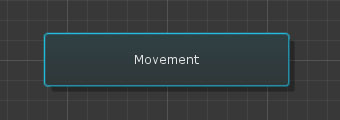
| Name |
Description |
| Set Default |
When entering a subgraph, the motion graph checks the connections out of the sub-graph to its child nodes in sequence. If none of the connections are valid then the default state or sub-graph will be chosen as a fallback. |
| Make Transition |
Starts a connection out of this node in the viewport. Clicking on another node will form a connection from this node to the clicked node. Clicking an empty area of the viewport will cancel the connection. |
| Move To Sub-Graph |
This will replace the state with a sub-graph with the same name, and then make this state a child of the new sub-graph. |
| Cut State |
Removes the state from the graph and adds it to the clipboard for pasting later. Any inbound and outbound connections will be removed. Right-click on an empty area of viewport to paste. |
| Copy State |
Copy the state to the clipboard. Right-click on an empty area of viewport to paste. |
| Delete |
Remove the state from the graph entirely, along with any inbound and outbound connections and attached behaviours. |
In The Inspector
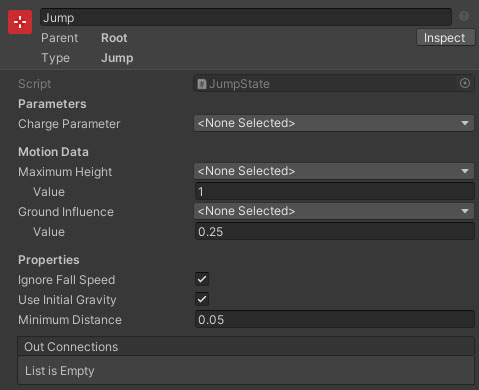
Each state will have its own properties visible before the Out Connections array. This array lists the connections from this state to other connectables, allowing you to jump to inspecting each of those targets. The Add Behaviour button allows you to add motion graph behaviours to the state which will be evaluated while the state is active.
See Also
The Motion Graph
The Motion Graph Editor