Movement MotionGraphState
Overview
The movement state handles basic ground based movement such as walking, sprinting and sneaking.
Inspector
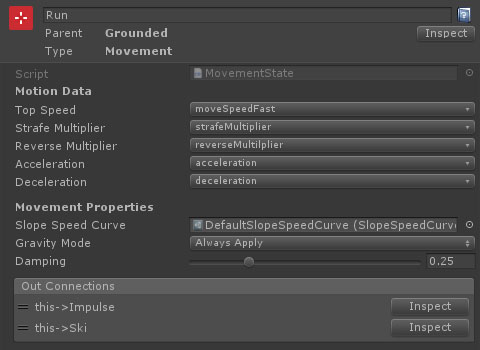
Properties
| Name | Type | Description |
|---|---|---|
| Top Speed | Float Data | The top movement speed (for keyboard input or max analog input). This can either be set as a value, or by referencing a float data entry. |
| Strafe Multiplier | Float Data | The multiplier applied to the max movement speed when strafing. This can either be set as a value, or by referencing a float data entry. |
| Reverse Multiplier | Float Data | The multiplier applied to the max movement speed when moving in reverse. This can either be set as a value, or by referencing a float data entry. |
| Acceleration | Float Data | The maximum acceleration. This can either be set as a value, or by referencing a float data entry. |
| Deceleration | Float Data | The maximum deceleration (when no input is applied). This can either be set as a value, or by referencing a float data entry. |
| Slope Speed Curve | SlopeSpeedCurve | an optional slope speed curve which controls the movement speed on sloping surfaces. Without this, the character controller will handle the speed change automatically. |
| Gravity Mode | Dropdown | When to apply gravity to the resulting move vector. Options are: Always Apply, When Not Grounded and Never Apply. |
| Damping | Float | The amount of damping to apply when changing direction. |