WallRun MotionGraphState
Overview
The WallRun state sticks the character to a wall and runs along it. It maintains the horizontal velocity and reduces gravity so that the character slowly moves down the wall. The state completes when the wall angles away from its initial plane, but you can also use conditions to transition out for things like downwards velocity over a certain threshold or input away from the wall.
The WallRun state is often paired with the PushOff state, using the wall normal to jump away from the wall.
Inspector
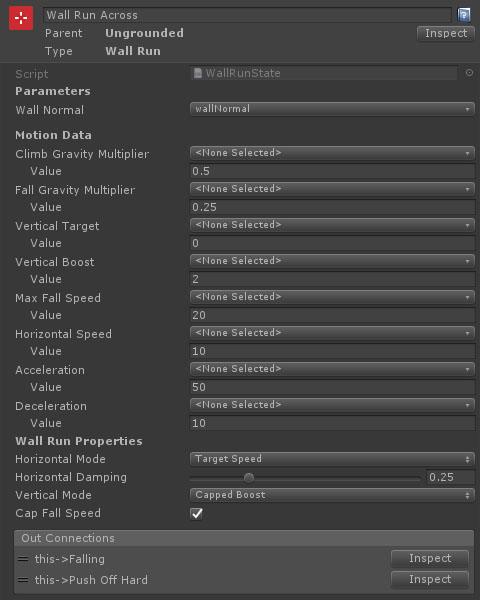
Properties
| Name | Type | Description |
|---|---|---|
| Wall Normal | VectorParameter | The vector parameter containing the wall normal. This will be read and written to each frame. |
| Climb Gravity Multiplier | FloatData | A multiplier applied to gravity acceleration when moving up the wall. |
| Fall Gravity Multiplier | FloatData | A multiplier applied to gravity acceleration when moving down the wall. |
| Vertical Target | FloatData | The target vertical speed. Visible if Horizontal Mode is set to CappedBoost, Minimum or FixedSpeed. |
| Vertical Boost | FloatData | An upward speed boost when first entering the state. Visible if Horizontal Mode is set to Vertical Boost or CappedBoost. |
| Max Fall Speed | FloatData | The maximum downward speed the character can reach while wall running. This property is only visible if Cap Fall Speed is set to true. |
| Horizontal Speed | FloatData | The target horizontal speed. Only visible if Horizontal Mode is set to TargetSpeed or MinimumSpeed. |
| Acceleration | FloatData | The acceleration up to the target speed. Only visible if Horizontal Mode is set to TargetSpeed or MinimumSpeed. |
| Deceleration | FloatData | The deceleration down to the target speed. Only visible if Horizontal Mode is set to TargetSpeed. |
| Horizontal Mode | Dropdown | How the horizontal wall run speed is calculated. MaintainExisting keeps the horizontal speed from the previous frame, TargetSpeed accelerates / decelerates to a set horizontal speed, MinimumSpeed accelerates up to the minimum speed if falling below it, but does not decelerate if faster. |
| Horizontal Damping | Float | The amount of damping to apply when changing direction or speed. Only visible if Horizontal Mode is set to TargetSpeed or MinimumSpeed. |
| Vertical Mode | Dropdown | How the vertical speed is calculated when entering the wall run. VerticalBoost adds an upward speed boost, CappedBoost adds an upward boost up to a maximum vertical speed, Minimum raises the vertical speed up to the minimum, MaintainExisting uses the vertical entry speed with no changes, FixedSpeed sets the vertical speed to a specific value |
| Cap Fall Speed | Boolean | Should the downwards fall speed be limited . |