AnimCurveDash MotionGraphState
Overview
The AnimCurveDash state is a simple movement state that layers a directional dash with speed based on an animation curve, on top of a basic movement system. This gives a lot of control over the feel of the dash, and also allows the player to have some control over the exit speed and dash distance.
Inspector
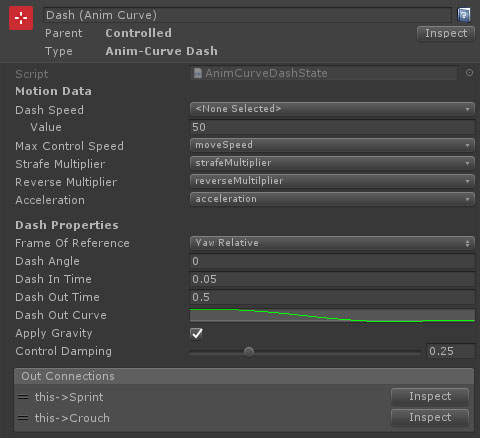
Properties
| Name | Type | Description |
|---|---|---|
| Dash Speed | FloatData | The target speed for the dash to reach. This will be layered on top of the control speed. |
| Max Control Speed | FloatData | The maximum speed the character can reach under motor control (driven by input). The dash velocity will be layered on top of this. |
| Strafe Multiplier | Float Data | The multiplier applied to the max movement speed when strafing. This can either be set as a value, or by referencing a float data entry. |
| Reverse Multiplier | Float Data | The multiplier applied to the max movement speed when moving in reverse. This can either be set as a value, or by referencing a float data entry. |
| Acceleration | Float Data | The input driven acceleration. |
| Dash Direction | Dropdown | The direction to base the dash off. This can be Yaw Relative or Move Relative. |
| Dash Angle | Float | The angle offset for the dash direction. For example, yaw relative and an angle of 90 will dash to the right. -90 will dash to the left. |
| Dash In Time | Float | The amount of time it takes to reach the dash speed. At this point, the animation curve kicks in to ease out of the dash. A Dash In Time of 0 is instant. |
| Dash Out Time | Float | The amount of time it takes for the animation curve kicks to ease out of the dash. |
| Dash Out Curve | Animation Curve | The ease out curve for the dash velocity. This should start at 1. Dipping below zero will mean the dash is moving backwards. |
| Apply Gravity | Boolean | Should the character fall with gravity during the dash. |
| Control Damping | Float | The amount of damping to apply to the controlled velocity when changing direction. |