InteractiveLadder MotionGraphState
Overview
The InteractiveLadder state handles climbing up and down interactive ladders. These are ladders are simple obstacles until interacted with, at which point the ladder TransformProperty will be set. You should set up an in-bound connection to this state with a TransformCondition that checks if the property is not null, and an outbound connection with another that checks if the property is null.
The character can exit the ladder by interacting with it again, jumping, or moving past the ladder limits. Doing any of these will set the ladder TransformProperty to null and the state completed flag to true.
The state has various properties for how the character climbs the ladder, along with camera constraints.
Inspector
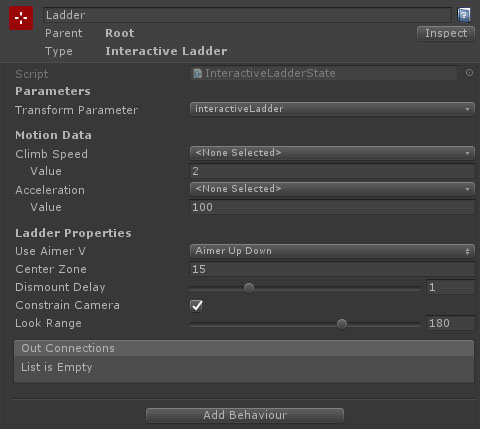
Properties
| Name | Type | Description |
|---|---|---|
| Transform Parameter | TransformParameter | The transform parameter on the graph that is used to attach to ladder transforms in the scene. |
| Climb Speed | Float Data | The maximum climb speed (based on input and aim). This can either be set as a value, or by referencing a float data entry. |
| Acceleration | Float Data | The acceleration when on the ladder or attching / dismounting. This can either be set as a value, or by referencing a float data entry. |
| Use Aimer V | Dropdown | Should the direction of the camera aim influence the vertical move direction?
|
| Center Zone | Float | For AimerUpDown, the angle past the horizontal you need to aim to flip directions. For AimerSmooth, the angle past the horizontal that reaches full speed. |
| Dismount Delay | Float | How long is the character blocked from stepping straight off the ladder using up/down? For example, if they attach to the top of the ladder then they should not immediately step off by pressing up. |
| Constrain Camera | Boolean | If true, constrain the camera's horizontal rotation to a maximum range from looking directly at the ladder. |
| Look Range | Float | The angle range (degrees) that the camera can turn from looking straight at the ladder (180 = 90 degrees to either side). |