SwimStrokeSurfaceState MotionGraphState
Overview
The SwimStrokeSurfaceState state is used to move in all axes when underwater. It moves in strokes, pulling forward and the recovering.
Inspector
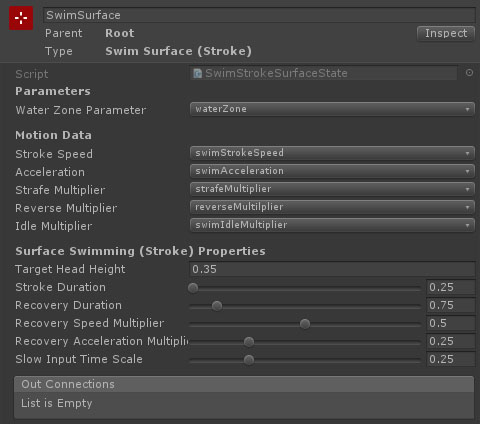
Properties
| Name | Type | Description |
|---|---|---|
| Water Zone | TransformParameter | The transform parameter which contains the transform of the water zone object. |
| Stroke Speed | FloatData | The top movement speed (for keyboard input or max analog input). |
| Acceleration | FloatData | The maximum acceleration. |
| Strafe Multiplier | FloatData | The multiplier applied to the max movement speed and acceleration when strafing. |
| Reverse Multiplier | FloatData | The multiplier applied to the max movement speed and acceleration when moving backwards. |
| Idle Multiplier | FloatData | The multiplier applied to the acceleration when no input is detected. |
| Target Head Height | Float | A target for the distance the character capsule should be above the surface. |
| Stroke Duration | Float | The length of time a swimming stroke lasts (will be scaled by strafe / reverse multipliers). |
| Recovery Duration | Float | The length of time in between swimming strkes (will be scaled by strafe / reverse multipliers). |
| Recovery Speed Multiplier | Float | A multiplier applied to the speed in between strokes. |
| Recovery Acceleration Multiplier | Float | A multiplier applied to the acceleration (and deceleration) in between strokes. |
| Slow Input Time Scale | Float | At the minimum input amount, how much slower are strokes and recovery. |