Impulse MotionGraphState
Overview
The Impulse state is a one frame state that adds or sets the character velocity. An example use is at the start of a crouch-slide to add an instantaneous speed boost.
Inspector
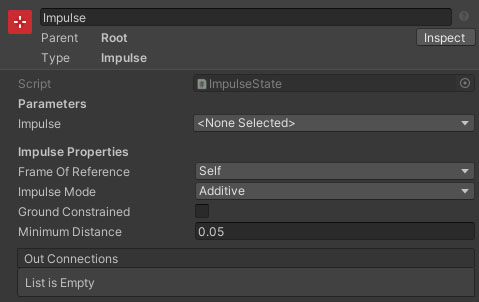
Properties
| Name | Type | Description |
|---|---|---|
| Impulse | VectorParameter | The velocity impulse to apply. |
| Frame Of Reference | Dropdown | The coordinate space to apply the impulse in. Options are Self and World. |
| Impulse Mode | Dropdown | How should the impulse be applied. Additive will add the impulse velocity to the original velocity. Replace Velocity will ignore the original velocity and use the impulse alone. |
| Ground Constrained | Boolean | If true, the impulse vector will be aligned onto the ground surface normal plane. |
| Minimum Distance | Float | The minimum distance the state should attempt to move before completing. This prevents a very small fixed time step causing the movement to be too small to overcome ground snapping / detection. |