Fly MotionGraphState
Overview
The Fly state is a simple noclip style flying style. The character moves based on their aim direction. Jump moves up, while crouch moves down.
Inspector
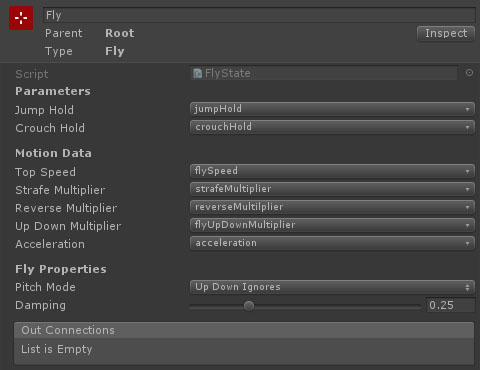
Properties
| Name | Type | Description |
|---|---|---|
| Jump Hold | SwitchParameter | The crouch hold parameter (used for flying up). |
| Crouch Hold | SwitchParameter | The crouch hold parameter (used for flying down). |
| Top Speed | FloatData | The top movement speed (for keyboard input or max analog input). |
| Strafe Multiplier | FloatData | The multiplier applied to the max movement speed when strafing. |
| Reverse Multiplier | FloatData | The multiplier applied to the max movement speed when moving backwards. |
| Up Down Multiplier | FloatData | The multiplier applied to the max movement speed when moving up/down. |
| Acceleration | FloatData | The maximum acceleration. |
| Pitch Mode | Dropdown | How does the camera pitch affect the movement. The available options are:
|
| Damping | Float | The amount of damping to apply when changing direction or speed. |