Jump MotionGraphState
Overview
The jump state adds a simple upward impulse to the character for a single tick and then sets its completed flag. You should add an out-bound connection from this state that uses the CompletedCondition, connecting to an airborne state.
Inspector
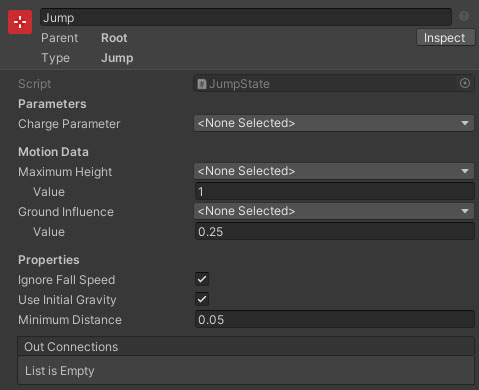
Properties
| Name | Type | Description |
|---|---|---|
| Charge Parameter | FloatParameter | The charge property is a float with value 0 to 1 that defines how high to jump. If no graph property is selected, the jump will always be performed with full strength. |
| Maximum Height | Float Data | The height the player will jump when fully charged. Note: Changes to gravity or physics multiplier after start will affect this. Also does not take step height into account. This can either be set as a value, or by referencing a float data entry. |
| Minimum Height | Float Data | The smallest height the player will jump (at the equivalent of a zero tap - actually unattainable). This can either be set as a value, or by referencing a float data entry. |
| Ground Influence | Float Data | The amount of influence the ground has over the direction of the jump. 0 = up, 1 = ground normal. This can either be set as a value, or by referencing a float data entry. |
| Minimum Distance | Float | The minimum distance the state should attempt to move before completing. This prevents a very small fixed time step causing the movement to be too small to overcome ground snapping / detection. |