Runtime Objects
Overview
The NeoFPS save system is able to save and load objects that are instantiated at runtime, providing they adhere to the following rules:
- The prefab must have a NeoSerializedGameObject on its root object.
- The prefab must be registered with the save sytem
- The object has to be instantiated by the the scene's SceneSaveInfo object or a parent NeoSerializedGameObject that is correctly set up.
Registering Prefabs
Prefabs can be registered in 2 places: on the SaveGameManager asset (NeoFPS/Resources/FpsSettings_SaveGames.asset by default), or on the scene's SceneSaveInfo object. Prefabs registered on the save game manager asset will be available at all times, however they (and all the assets such as textures and audio clips they reference) will be loaded into memory at all times. If the prefab is only supposed to be available in a few scenes then it should be registered in those scenes only.
The process for registering a prefab is the same for both situations. The SaveGameManager asset and the SceneSaveInfo monobehaviour both have the following section in the inspector:
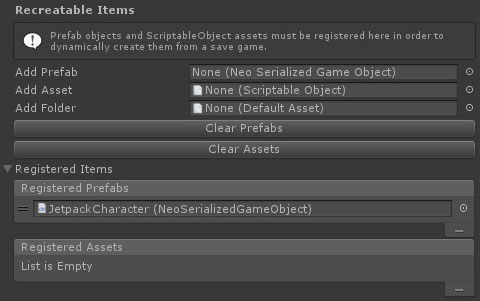
To register a prefab, you can drag it from the project view into the Add Prefab field. Alternatively you can drag a folder from the project view onto the Add Folder field and every prefab in that folder or its subfolders that has a NeoSerializedGameObject on its root will be registered. Each item will only be registered once, and duplicate items will be skipped.
To view the registered prefabs, you can expand the Registered Items foldout at the bottom of the inspector. The order of the items has no effect. You can remove an item by selecting the marker on the left (=) and hitting the - button at the bottom of the list. You can also click the Clear Prefabs button to remove all registered prefabs from the list.
Instantiating Prefabs
Instantiating a serializable prefab should now be done via one of the following static methods:
T NeoPrefabFactory.InstantiatePrefab<T>(T prototype, Component source);
T NeoPrefabFactory.InstantiatePrefab<T>(T prototype, Component source, Transform parent);
T NeoPrefabFactory.InstantiatePrefab<T>(T prototype, int serializationKey, Component source);
T NeoPrefabFactory.InstantiatePrefab<T>(T prototype, int serializationKey, Component source, Transform parent);
T NeoPrefabFactory.InstantiatePrefab<T>(T prototype, Component source, Vector3 position, Quaternion rotation, TranslationSpace space = TranslationSpace.Local);
T NeoPrefabFactory.InstantiatePrefab<T>(T prototype, Component source, Transform parent, Vector3 position, Quaternion rotation, TranslationSpace space = TranslationSpace.Local);
T NeoPrefabFactory.InstantiatePrefab<T>(T prototype, int serializationKey, Component source, Vector3 position, Quaternion rotation, TranslationSpace space = TranslationSpace.Local);
T NeoPrefabFactory.InstantiatePrefab<T>(T prototype, int serializationKey, Component source, Transform parent, Vector3 position, Quaternion rotation, TranslationSpace space = TranslationSpace.Local);
NeoSerializedGameObject NeoPrefabFactory.InstantiateFromID(int prefabID, int serializationKey, Component source);
NeoSerializedGameObject NeoPrefabFactory.InstantiateFromID(int prefabID, int serializationKey, Component source, Transform parent);
T NeoPrefabFactory.InstantiateFromID<T>(int prefabID, int serializationKey, Component source);
T NeoPrefabFactory.InstantiateFromID<T>(int prefabID, int serializationKey, Component source, Transform parent);
The "source" component parameter is used to check that the scene of the new object matches the behaviour that instantiated it. This prevents, for example, the object being instantiated inside the loading screen scene and then destroyed when the loading scene is removed.
If the prefab that's instantiated does not have a NeoSerializedGameObject at its root then it will be instantiated the standard Unity way. Otherwise it will be given unique serialization ID, registered with the parent object or scene and flagged as a runtime object.
The InstantiateFromID methods are usually used by the save game manager when rebuilding the scene hierarchy, but it can also be used in special situations where you don't want the save system to generate unique IDs.
Destroying Objects
You can destroy an object using the standard Destroy() method. If the object was instantiated at runtime then it will simply be unregistered by the parent object or scene. If the object was in the scene hierarchy on load, then it will be flagged for destruction by the scene or parent object.
Changing Hierarchy
Each NeoSerializedGameObject is attached to its parent or the scene on load or instantiation. If you want to move an object from one NeoSerializedGameObject parent to another, then you can use the standard Unity transform.SetParent() method.
Runtime instantiated objects must be a direct child of their parent NeoSerializedGameObject. The save game InstantiatePrefab() methods will enforce this, but the object hierarchy must not be changed separately. If the object that was moved was not runtime instantiated then the save system will treat it as though the original was destroyed and a new object instantiated in the new location. This means the that object must be a prefab that is registered with the save system for runtime instantiation in order for this to work.
Loading Process
When a scene is loaded from a save game, the system starts by loading the scene as standard. As soon as the scene is available, the NeoSerializedGameObject hierarchy is traversed and any changes to the hierarchy made. In order from the root NeoSerializedGameObject objects to the children, any objects that are flagged for destruction in the save are destroyed. Any runtime instantiated objects registered with the parents are instantiated via their prefab ID and assigned their original serialization ID. Once the hierarchy has been rebuilt, it is traversed again to load all the stored component data.