AnimatedFirearmSprintHandler MonoBehaviour
Overview
The AnimatedFirearmSprintHandler behaviour is attached to a modular firearm to model different sprinting mechanics. This version allows you to use keyframed sprint animations on your weapons by setting a bool parameter on an Animator component when the sprint animation should play, and a float parameter to tell the animator the speed. You can use this to set the clip playback speed in the AnimatorController, or to drive a blend between multiple animation clips based on speed.
Inspector
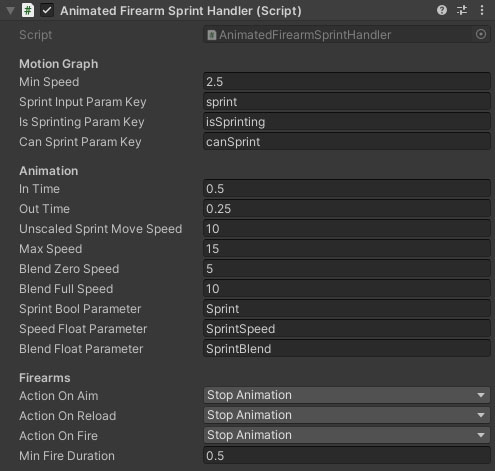
Properties
Motion Graph
| Name |
Type |
Description |
| Min Speed |
Float |
The minimum speed the character must be moving for the sprint animation to play. |
| Sprint Input Param Key |
String |
(Required) The switch parameter on the motion graph which is set by the input handler to tell the character when to sprint. |
| Is Sprinting Param Key |
String |
(Required) A switch parameter on the motion graph which the graph sets when the character is sprinting. |
| Can Sprint Param Key |
String |
(Optional) A switch parameter on the motion graph which tells the character if it can sprint or not. |
Animation
| Name |
Type |
Description |
| In Time |
Float |
The time taken to blend into the sprint animation. |
| Out Time |
Float |
The time taken to blend out of the sprint animation to idle. |
| Unscaled Sprint Move Speed |
Float |
The movement speed that the sprint animations are synced to when playing at 1x speed.. |
| Max Speed |
Float |
A maximum speed clamp for the character when used to calculate the animation speed multiplier. |
| Blend Zero Speed |
Float |
The speed below which the light sprint animation will be 100% used. Above this, the heavy animation is blended in. |
| Blend Full Speed |
Float |
The speed above which the he\vy sprint animation will be 100% used. Below this, the light animation is blended in. |
| Sprint Bool Parameter |
String |
A bool parameter on the Animator to signify when the weapon enters or exits sprint. |
| Speed Float Parameter |
String |
A float parameter on the Animator to set the playback speed of the sprint animation. |
| Blend Float Parameter |
String |
A float parameter on the Animator used to blend between the light and heavy sprint animations. |
Firearms
| Name |
Type |
Description |
| Action On Aim |
Dropdown |
What to do when the firearm enters / exits ADS. Stop Sprinting completely stops the character from sprinting until they leave ADS. Stop Animation stops the firearm sprint animation without affecting the character movement. CannotAim blocks the player from aiming down sights while sprinting. |
| Action On Reload |
Dropdown |
What to do when the firearm is reloaded. Stop Sprinting completely stops the character from sprinting until the reload animation completes. Stop Animation stops the firearm sprint animation without affecting the character movement. |
| Action On Fire |
Dropdown |
What to do when the firearm trigger is pulled while sprinting. Stop Sprinting completely stops the character from sprinting until the weapon stops firing. Stop Animation stops the firearm sprint animation without affecting the character movement (both of these have a slight delay before firing to allow the weapon to be aligned). Cannot Fire means that the firearm trigger is blocked until the character stops sprinting. |
| Min Fire Duration |
Float |
The minimum amount of time the firearm sprint animation will be paused or sprinting blocked when the trigger is pulled. Prevents rapid tapping of the trigger popping in and out of sprint. |
See Also
Modular Firearms
The Motion Graph
Unity Animator
Unity AnimatorController