Overview
The HealToolAction behaviour adds the ability to heal the wielder or another subject to a wieldable tool.
Inspector
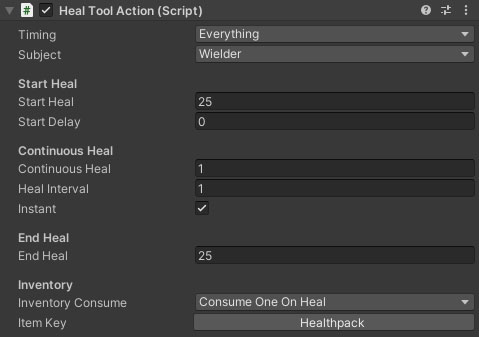
Properties
| Name |
Type |
Description |
| Timing |
Dropdown |
When should the tool apply the heal. |
| Subject |
Dropdown |
Who/what to heal. Wielder means the character using the tool will heal themselves. Target means the tool will be used on the health manager in front of the user. |
| Target Layers |
LayerMask |
The physics layers that the tool should check against to get a valid heal subject. |
| Max Range |
Float |
The maximum distance in front of the character that the tool should cast to check for valid heal subjects. |
Start Heal
| Name |
Type |
Description |
| Start Heal |
Integer |
How many points to heal the subject for in the start action. |
| Start Delay |
Integer |
How many fixed frames since the start of the action before the heal is applied. |
| Post Heal Time |
Integer |
How long (in fixed frames) to block after the heal to prevent the tool immediately deselecting. |
Continuous Heal
| Name |
Type |
Description |
| Continuous Heal |
Integer |
How many points to heal the subject for the continuous action. |
| Heal Interval |
Integer |
The heal will be applied every nth fixed update tick for continuous heals. |
| Instant |
Boolean |
Should the heal be applied on the first frame of the continuous action, or should it wait for the first interval to elapse. |
End Heal
| Name |
Type |
Description |
| End Heal |
Integer |
How many points to heal the subject for in the end action. |
Inventory
| Name |
Type |
Description |
| Inventory Consume |
Dropdown |
Should the heal consume an inventory item, and how should that work. Options are NoInventoryItem, ConsumeOneOnHeal and ConsumeHealAmount. |
| Item Key |
Inventory ID Picker |
The inventory ID of the object to consume on healing. Clicking this button will show the inventory database browser. |
See Also
Wieldable Tools
Health and Damage