SimpleReloader MonoBehaviour
Overview
The SimpleReloader behaviour triggers a reload animation and waits until it completes before taking ammo from the firearm's ammo module and adding it to the magazine.
Inspector
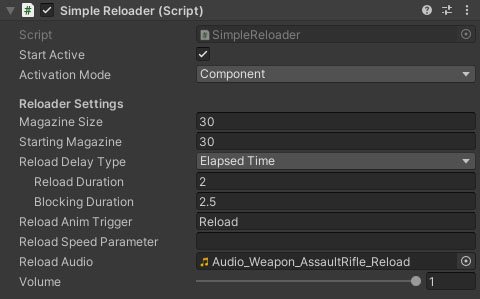
Properties
| Name | Type | Description |
|---|---|---|
| Start Active | Boolean | Should this module register as the active reloader immediately on start. |
| Activation Mode | Dropdown | How does module activation work. Options are: Component means the component will be enabled / disabled - use this when you have multiple modules on an object such as the firearm root. GameObject activates / deactivates the object - use this for attachments where you want the geo to appear/disappear. |
| Magazine Size | Float | The number of rounds that can be fit in the magazine at once. |
| Starting Magazine | Float | The number of rounds in the magazine on initialisation. |
| Reload Delay Type | Dropdown | The delay type between starting and completing a reload. The options are None, Elapsed Time, External Trigger. |
| Reload Duration* | Float | The time taken to reload. |
| Blocking Duration* | Float | The time taken before you can use the weapon again after the reload starts. |
| Reload Anim Trigger | String | The AnimatorController trigger key for the reload animation. |
| Reload Speed Parameter | String | A float parameter in the weapon AnimatorController that will be assigned the reload speed (use for animation clip playback speed setting on reload animations). |
| Reload Audio | AudioClip | The audio clip to play while reloading. |